
The free version runs on a live Exness, XM or HFM account opened through our links and registered with us (it does not start on demo accounts; you can check how it works in the Strategy Tester). The paid version is sold on MQL5 Market and needs no account registration.
🥇 GOLD EA (XAUUSD · 4-ENGINE PORTFOLIO)
GOLD NEURON EA
Four engines work together in one account: a regime-filtered trend core and a momentum breakout cover each other's weak market conditions, an ML pivot engine filters its entries with a gradient-boosting gate, and BLITZ (added in v3.15, always on) trades M15 Donchian breakouts. Each engine uses its own fixed timeframe, independent of your chart timeframe. No martingale, but the trend core and the momentum engine add equal-lot positions against the market (averaging down). No external files or DLLs.
🌱 4-line summary for beginnersGlossary
- What does this EA do?
- A trend-following EA bundling four engines on gold (M30/M15). 22.5 years of real-tick testing: PF 1.35, equity DD 28.5%.
- Price?
- Free: register an account with a partner broker and download a copy locked to that account. If you don't want to open an account, buy it on the MQL5 Market (buy-out or rent; the price is shown on the purchase page). Both options are lower on this page.Go to the free download steps ↓
- Who it suits
- People who want steady signal frequency on gold over the long run and can tolerate a DD near 40%.
- After getting it
- Install MT5
- Free version: put the downloaded file in the MT5 Experts folder. If bought on MQL5, it appears in the MT5 'Market' tab. Drag it onto a chart and set it up
- Check it in the Strategy Tester first, then start on a XAUUSD M30 chart with the minimum lot
🔄 v3 replaced the engine entirely — older figures are withdrawn
With v3 this product moved from a single AI-decision design to a multi-engine architecture; v3.13 made the ML pivot gate the third engine and v3.15 adds BLITZ as the fourth. The figures published for the v1 line (once-daily decisions, the high Y2025 multiples) are withdrawn. Every headline number on this page comes from a 22.5-year (2004.01-2026.06) 100% real-tick measurement with all four engines running (measured on a build that only adds to v3.16 the suppression of panel drawing in the Strategy Tester; the trading logic is identical). Before release, v3.15 was compared with the three-engine build under identical conditions (XAUUSD, XM 1-minute OHLC, Ultra, $10,000, 1:500, 2022.01-2026.08): net profit 6,653 → 8,129, PF 1.19 → 1.22, max equity DD 39.79% → 27.68%. 2024 and Jan-Aug 2026 were lower than before. v3.16 changes BLITZ sizing (its own quarter share; the three core engines are back to one third each, so total exposure is higher than in v3.15) and adds a rule that BLITZ stays out while the balance is at its running peak — a rule fitted to the test period. Note: the v3.15 comparison above was run on XM 1-minute OHLC data, not real ticks. The same comparison for v3.16 vs v3.15: net profit 8,129 → 9,191, PF 1.22 → 1.19, relative equity DD 27.68% → 36.85%, trades 611 → 595 — more profit, worse risk figures. A real-tick comparison will be added when measured.
⚠ Aggressive EA (high risk) — please read
The shipping default (Ultra) reached a 28.5% equity drawdown over the 22.5-year measurement (the percentage at the point where the drop in money terms was largest), and in the early years, when the account was still small, the drop reached 55.5% in percentage terms. If you want lower risk, choose Standard (19.95% equity DD; 39.0% at its deepest in percentage terms) or Defensive. Trade only money you can afford to lose, and always start with a small account.
⚡ Minimum deposit: from $100
XAUUSD, any chart timeframe (signals are computed on a fixed M30), 1:500 leverage recommended. Compounding percent-of-equity sizing follows your balance automatically. For small or conservative accounts, use a micro (cent) account with Defensive mode.
Profit Factor
1.35
Expectancy
Win rate
53.3%
2,766 trades
Max DD
55.50%
Equity DD
Annual (compound)
+18.1%
+$1,810/yr (on $10,000)
Attach to: XAUUSD M30 — The strategy reads the M30 timeframe. On any other chart it will place no trades at all. When testing in the MT5 Strategy Tester, set the symbol and timeframe to XAUUSD M30 as well.
Verification Status
How far verification has progressed, from backtest to forward testing
- BacktestDone
- Period
- M30 (2004.01.01 - 2026.09.01)
- History quality
- 100% real ticks
- Trades
- 2766
- PF
- 1.35
- Max DD (relative, equity)
- 55.54% (equity DD at the largest loss in money terms: 28.50%)
- Recommended minimum capital
- $1,000+ recommended
- OOSDone
- Data source
- MT5 official ticks
- Years verified
- 22.5
- ForwardIn progress
This EA is in forward testing. Results for all EAs are published together on the forward test page.
See all forward tests → - LiveNot started
HOW IT WORKS — FOUR ENGINES
How it works — four engines in one account
Engine A (trend core) uses a regime filter to trade pullbacks only in trending conditions; Engine V (VIPER) trades momentum breakouts out of volatility contraction; Engine B (BLITZ) trades M15 Donchian channel breakouts filtered by the H1 50 MA and ADX. Because they favour different market states, running them in one account spreads the opportunity set.
- Entry: each engine decides independently on its own fixed timeframe (trend core and momentum on M30, ML pivot and BLITZ on M15), independent of the chart timeframe. The trend core adds equal-lot positions up to 3 in total and the momentum engine up to 5 in total, each after a further 1 ATR move against the group. Since v3.16 BLITZ is sized on its own quarter of the balance on top of the three core engines' one-third shares, and it opens no new position while the account balance, net of deposits and withdrawals, stands at its running peak.
- Exit: the trend core and the momentum engine close each group as a whole — group take-profit at 3 ATR (the momentum engine trails beyond it) and group stop at a 1.5 ATR move on the total volume, checked by the EA on every tick. These positions have no stop loss on the broker server, so keep the EA running. The ML pivot and BLITZ engines send a fixed stop loss to the server with every order. No lot escalation (no martingale).
- Risk: compounding percent-of-equity sizing with margin and volume-cap guards. The risk budget is split equally across enabled engines, and the RunMode dropdown scales the whole thing across four levels.
- No external files or DLLs. The MQL5 Market edition runs offline; the fxea365.com download edition connects to fxea365.com only for the license check and update notice (allow WebRequest). An economic-calendar filter (NFP/FOMC avoidance) is built in.
📈MT5 Strategy Tester Report — GOLD NEURON EA

📋 About this report
- Official report generated by the MT5 Strategy Tester (real-tick data)
- Multi-year real price data with the every-tick (real ticks) model
- Balance curve (blue) / Equity curve (green) shows floating losses too
- Past results do not guarantee future profits
VALIDATION — 22.5 YEARS, 100% REAL TICKS
Validation — 22.5 years, 100% real ticks
Measured end-to-end on Dukascopy-sourced real ticks (XAUUSDduka) with the MT5 Strategy Tester in Model=4 (100% real ticks) across 2004.01.01-2026.06.26, 22.5 years, using default inputs (four engines), a $10,000 start and 1:500. Cross-validation on a third-party feed and Monte Carlo testing have not been run, so they are not shown here.
| Preset | Window | Total return |
|---|---|---|
| Ultra (shipping default) | 22.5y | +4,160% |
| Standard | 22.5y | +1,122% |
Note: because signals are computed on a fixed M30 timeframe, differences in chart timeframe or broker GMT offset do not affect them.
All figures above are backtest measurements and do not guarantee future performance.
3-ENGINE BACKTEST — SUPPLEMENTARY DISCLOSURE
3-Engine Backtest (Supplementary Disclosure)
Supplementary backtest with all three engines enabled (Trend + Momentum BO + ML Pivot, RunMode=Ultra). Conditions: XM (symbol GOLD) / M30 / Model=1 (1-minute OHLC — NOT real ticks) / 2022.01–2026.07 (4.5 years) / initial deposit 10,000 USD / includes the ML in-sample training period. No htm report was produced; figures were reconstructed from the Strategy Tester log trade stream (only the final balance is the official value).
Results: final balance 15,276.39 USD (+52.8% / 4.5 years, simple annual ≈11.7%), 477 trades, PF 1.22 (price-diff basis; lower incl. swap), win rate 59.5%, max balance drawdown 35.3%.
Not directly comparable to the published figures on this page (100% real ticks, 22.5 years, four engines).
View the full reconstructed report (HTML)⚠ Where it struggles — main risks
- The two core engines trade direction and breakouts, so extended low-volatility chop with no clear direction accumulates small losses.
- The shipping default Ultra reached 28.5% equity DD over 22.5 years (the percentage at the point where the drop in money terms was largest). In the early years, when the account was still small, the open loss reached 55.5% in percentage terms. Choose Standard or Defensive if that is unacceptable.
- Ultra is the measured ceiling for the risk multiplier; raising it further has been measured to break down in over-Kelly territory. Modifying inputs upward risks ruin.
- Backtests are past results and do not guarantee future profits. Live track record is still accumulating.
ONE DROPDOWN — FOUR RISK PRESETS
RunMode dropdown — four risk presets
| Preset | Risk × | Return (real tick, 22.5 years) | Max equity DD | Max DD (deepest %) |
|---|---|---|---|---|
| Defensive | 0.5 | x3.8 | 9.96% | 21.4% |
| Standard | 1.0 | x12.2 | 19.95% | 39.0% |
| Aggressive | 2.0 | x34.2 | 28.0% | 55.2% |
| Ultra (default) | 2.0 | x42.6 | 28.5% | 55.5% |
All presets share the same signals and differ only in risk multiplier. Figures are measured on XAUUSDduka, 100% real ticks (Model=4), 2004.01.01-2026.06.26 (22.5 years), $10,000 start, 1:500, default inputs. All four presets are measured under the same conditions. “Max equity DD” is the percentage at the point where the drop in money terms was largest; “Max DD (deepest %)” is the deepest drop in percentage terms, including the early years when the account was still small. Ultra is the measured ceiling for the risk multiplier — going beyond it collapses in over-Kelly territory, as measured on the earlier two-engine configuration.
Always-on chart panel
Once the EA is on the chart, a panel shows its status at a glance.
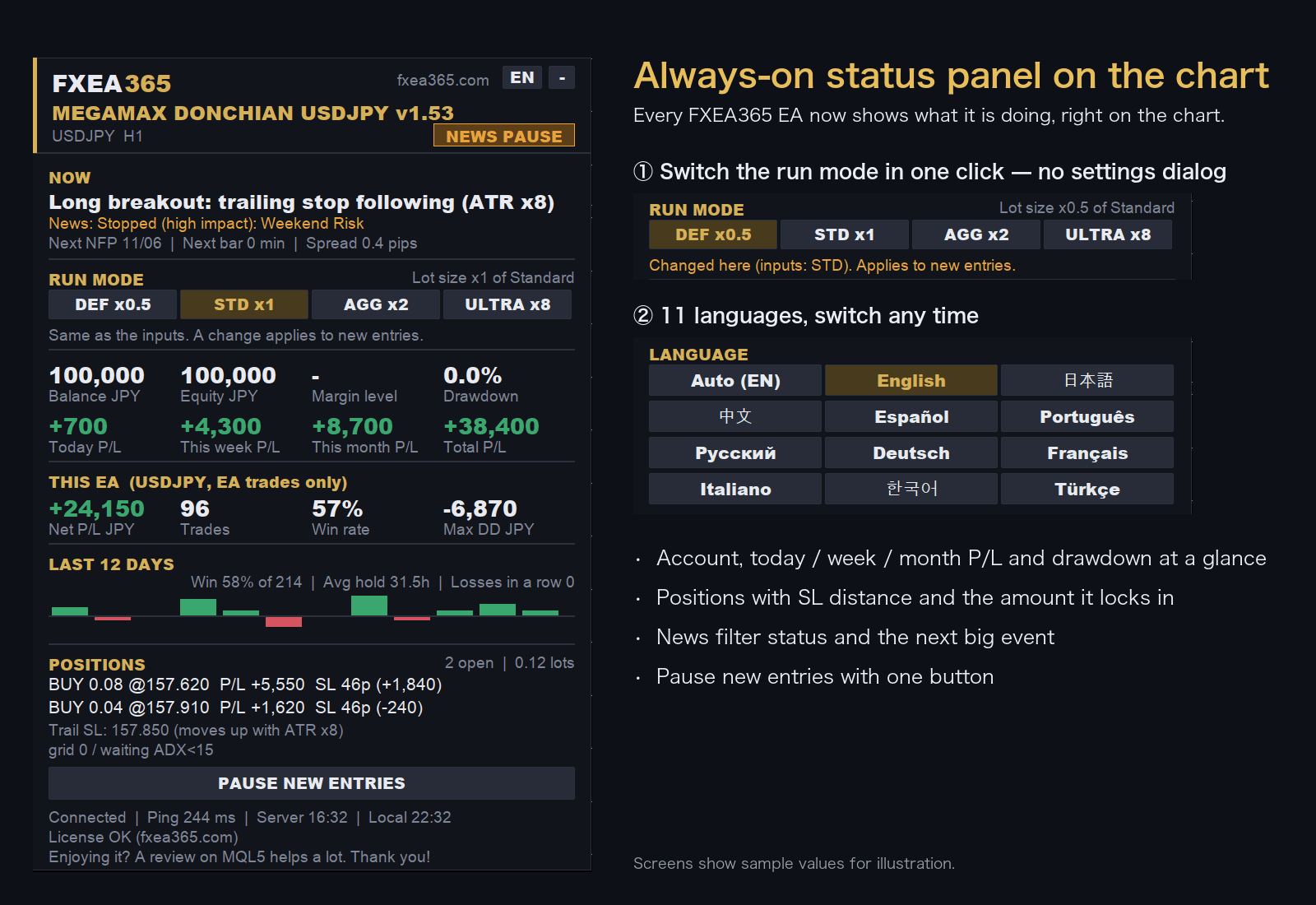
- Switch the run mode with a button on the chart (no need to reopen the settings)
- Choose the display language from 11 languages
- Live P/L, maximum drawdown and EA net profit
- Open positions with distance to SL
Screens show sample values for illustration.
EA Setup Guide
- Copy to the MQL5/Experts folderCopy the .ex5 file to the MQL5/Experts folder inside the MT5 data folder (File > Open Data Folder)
- Allow fxea365.com in MT5 WebRequest settingsIn MT5 open Tools → Options → Expert Advisors, tick "Allow WebRequest for listed URL", add https://fxea365.com and press OK. The EA checks your account licence there on start-up; without this it stops with "code=4014"
- Attach the EA to a chartOpen the chart for the target currency pair, drag the EA from the Navigator panel onto the chart, check "Allow Algo Trading," and click OK
- Turn on the Algo Trading buttonTurn on the "Algo Trading" button (green) in the MT5 toolbar. A smiley face (😊) in the top right of the chart means it is running
How to Set Up an EA in MT5 | From Installation to Operation →
Free download (register your account number)
STEP 1 Prepare your account
Using the EA requires an MT5 account opened through our referral link. If you already have an account, please create an additional account.
No account yet — open a new account via the links below
Adding an account — create an additional account in your member pageSee how →
Buy the paid version (MQL5 Market, no account registration)
Buy GOLD NEURON EA
Buy on the official MetaQuotes Market (MQL5 Market). Payment, licensing and automatic updates are all handled inside the MT5 app.
Check the MQL5 product listing for current pricing, rental terms and availability.
Buy on MQL5 Market →Buy on the official MetaQuotes Market — install directly in MT5 with automatic updates. No account registration needed.
Compare the available free distribution first
The free distribution may have separate eligibility and registration requirements. Review those terms before choosing the MQL5 edition.
Review free-download requirements →Before you buy
- Check MT4/MT5 compatibility and the current price on the MQL5 product page.
- Free-distribution and MQL5 editions may have different license terms; verify before purchase.
- Backtest results do not guarantee live returns. Review maximum drawdown and the test period.
Figures shown are backtest measurements on 100% real ticks (Model=4) — MT5 Strategy Tester, default inputs, XAUUSDduka, 2004-2026. They do not guarantee future results. Automated FX trading carries the risk of losing your capital; use risk capital only.
Frequently asked questions
- What is the difference between the free and paid versions?
- The free version works once you register the number of an Exness, XMTrading or HFM trading account opened through our referral link. The paid version is a one-time purchase on MQL5 Market and needs no account registration. For some EAs the version or default settings differ between the two (see the version shown on each page).
- What happens if I change accounts?
- The free version runs only on the account number you registered. To use it on another account, register again with that account number.
- Can I backtest it?
- Yes. The MT5/MT4 Strategy Tester does not check the account, so you can test on any account type.
- Can I use it on a demo account?
- No. The free version runs only on the registered live trading account. Use the Strategy Tester to check how it behaves.
- What if the EA does not trade?
- See "Common problems and fixes" in the setup guide. How to Set Up an EA in MT5 | From Installation to Operation →
Articles about this EA
Best MT5 EAs Compared (2026): Gold, Yen Crosses, Crypto, Multi-Asset
All fxea365 MT5 Expert Advisors in one table: XAUUSD, USDJPY, EURJPY, GBPJPY, BTCUSD and ETHUSD EAs ranked by PF, max drawdown and test period.
Best Gold EA (XAUUSD) Comparison Guide [2026]
Compare MT5 EAs for XAUUSD (Gold) trading using backtest data. All EAs listed by Profit Factor, max drawdown, trade count and test period — plus selection tips and recommended brokers.
We Backtested 43 Popular Gold EAs on 11.5 Years of Real Data
We ran 43 best-selling paid gold (XAUUSD) EAs from the MQL5 Market through 11.5 years of MetaQuotes real data (2015–2026, 99% history quality), all on default settings. A $1,999 bestseller lost 99% of the account, price had zero correlation with quality, and 40% genuinely survived. Full named ranking and methodology inside.
How Much Do Backtests Differ by Broker? One EA, 4 Brokers, 10 Years
The same EA with the same settings can show net profits several times apart depending on the broker. We backtested three of our EAs for 10 years on MetaQuotes, Exness, XM and HFM and separated the three causes: compounding, server time and price data.
Price action auto trade bot Review: PF 1.72, Max DD 34.83%
We backtested the MQL5 EA Price action auto trade bot under the same conditions as our own EAs (Jan 2020 – Feb 2024, $10,000, 1:500, 100% real ticks, default settings): PF 1.72, max DD 34.83%, 91 trades. Comparison with our EAs, full conditions and limitations — facts only.