

The free version runs on a live Exness, XM or HFM account opened through our links and registered with us (it does not start on demo accounts; you can check how it works in the Strategy Tester). The paid version is sold on MQL5 Market and needs no account registration.
GOLD KING EA
⚔ Verified 7.5 years on two real feeds · aggressive session basket grid
Exness 7.5y backtest (2019-2026, XAUUSD M1, swap included, history quality 5%) achieved PF=4.66 / DD=91.3% / +73.7%/yr.An aggressive EA that passed every gate: two independent real feeds (Dukascopy/Exness), 4 walk-forward windows, cross-broker and parameter-cliff tests. NOTE: worst-window relative DD is 91.3% — the blow-up risk is disclosed, not hidden.
- ・Exness 7.5y backtest (2019-2026, history quality 5%): PF=4.66 / DD=91.3% / 2827trades / win rate83%
- ・compounded per year +73.7%
- • Worst relative DD 91.3% (measured in the Aug-2020 gold-crash window) — high DD disclosed by design
- • Strategy: 7 scheduled slots (DeMarker seeds) + same-size recovery grid (no martingale) + net basket TP
- • Safety: margin emergency close + daily-loss halt + news filter + automatic timezone alignment
- ・4 risk presetsone dropdown switches Defensive to Ultra (published = Ultra at PF=4.66 )
🌱 4-line summary for beginnersGlossary
- What does this EA do?
- An ultra-aggressive session grid EA on gold M1. PF 4.66 over 7.5 years, but max DD 91% — it has survived a near-total wipeout.
- Price?
- Free: register an account with a partner broker and download a copy locked to that account. If you don't want to open an account, buy it on the MQL5 Market (buy-out or rent; the price is shown on the purchase page). Both options are lower on this page.Go to the free download steps ↓
- Who it suits
- Experienced traders chasing high returns who accept one very large loss. Not a good first EA for a beginner.
- After getting it
- Install MT5
- Free version: put the downloaded file in the MT5 Experts folder. If bought on MQL5, it appears in the MT5 'Market' tab. Drag it onto a chart and set it up
- Check it in the Strategy Tester first, then start on a XAUUSD M1 chart with the minimum lot
FXEA365 GOLD KING v6 features
| Item | FXEA365 GOLD KING v6 |
|---|---|
| Profit Factor | 4.66 (Exness 7.5y backtest, history quality 5%) |
| Worst relative DD | 91.3% (measured, Aug-2020 crash window; aggressive) |
| Verification | 7.5y x 2 feeds (Dukascopy/Exness) + 4 WF windows |
| Price | Free (account registration only) |
| Risk switch | 4 presets (Defensive/Balanced/Aggressive/Ultra) |
| Blow-up guards | Margin emergency close + daily-loss halt + news filter |
Verification Status
How far verification has progressed, from backtest to forward testing
- BacktestDone
- Period
- M1 (2019.01.01 - 2026.06.01)
- History quality
- 5% real ticks — real-tick coverage is low for this period, so fill prices are reproduced less accurately
- Trades
- 2827
- PF
- 4.66
- Max DD (relative, equity)
- 91.27% (equity DD at the largest loss in money terms: 42.80%)
- Recommended minimum capital
- $1,000+ recommended
- OOSCaution
- Data source
- MT5 official ticks
- Years verified
- 7.5
- ForwardIn progress
This EA is in forward testing. Results for all EAs are published together on the forward test page.
See all forward tests → - LiveNot started
How the strategy works (entry, stop, target)
On XAUUSD M30 it trades only volatility-expansion regimes, riding strong channel-breakout momentum to large ATR-scaled targets. In quiet markets it simply stands aside (v3, 8.5 years of real-tick verification, all 9 years positive).
Verification gates passed
| Cycle | Gate | PF | DD | Result |
|---|---|---|---|---|
| 1 baseline | IS/OOS split — both profitable | — | — | ✓ |
| 2 (1c) | Lot sensitivity (cliff) — plateau up to preset levels | — | — | ✓ |
| 3 (2b) | Cross-broker (Duka vs Exness) — within 4% | — | — | ✓ |
| 4 (3b) | Walk-forward 4 windows — ALL profitable (PF 5.2-13.3) | — | — | ✓ |
| ★ Published (v6.24) | Zero-input default matches the published report (drift gate) | 4.66 | 91.3% | +73.7%/yr |
📈MT5 Strategy Tester Report — GOLD KING v6 EA
📋 About this report
- Official report generated by the MT5 Strategy Tester (real-tick data)
- Multi-year real price data with the every-tick (real ticks) model
- Balance curve (blue) / Equity curve (green) shows floating losses too
- Past results do not guarantee future profits
⚠ Warnings (aggressive)
- This EA is high-risk / high-return (aggressive). Worst-window relative DD is 91.3% (measured); a sharp gold crash can wipe out most or all of the account
- Past backtest results do not guarantee future profit. Trade only with money you can afford to lose
- For a defensive profile choose the Defensive / Balanced preset
- XAUUSD (GOLD/XAUUSDm) only / leverage 1:500 recommended / the published backtest starts from $10,000 (results with smaller balances have not been tested)
- VPS recommended (24h operation; session timing is critical — automatic TZ alignment built in)
Risk preset (InpRiskMode)
GOLD KING v6 does not use RunMode. Instead, choose a verified risk preset with "InpRiskMode" in the settings. It ships set to Ultra, the same as the published backtest.
Defensive
The lowest lot setting (2 concurrent baskets).
Balanced
Between defensive and aggressive (2 concurrent baskets).
Aggressive
Larger lots (1 basket). Drawdowns get deeper.
Ultra
DefaultThe published backtest setting (wider entry window). The highest-risk preset.
Manual
Uses the lot, time window and basket inputs below as they are.
The older GOLD KING v3 included in the package uses run modes (Defensive/Standard/Aggressive; ships as Standard). The parameter list below is for v6.
Past performance does not guarantee future results. With compounding on, lots adjust automatically to the balance.
Always-on chart panel
Once the EA is on the chart, a panel shows its status at a glance.
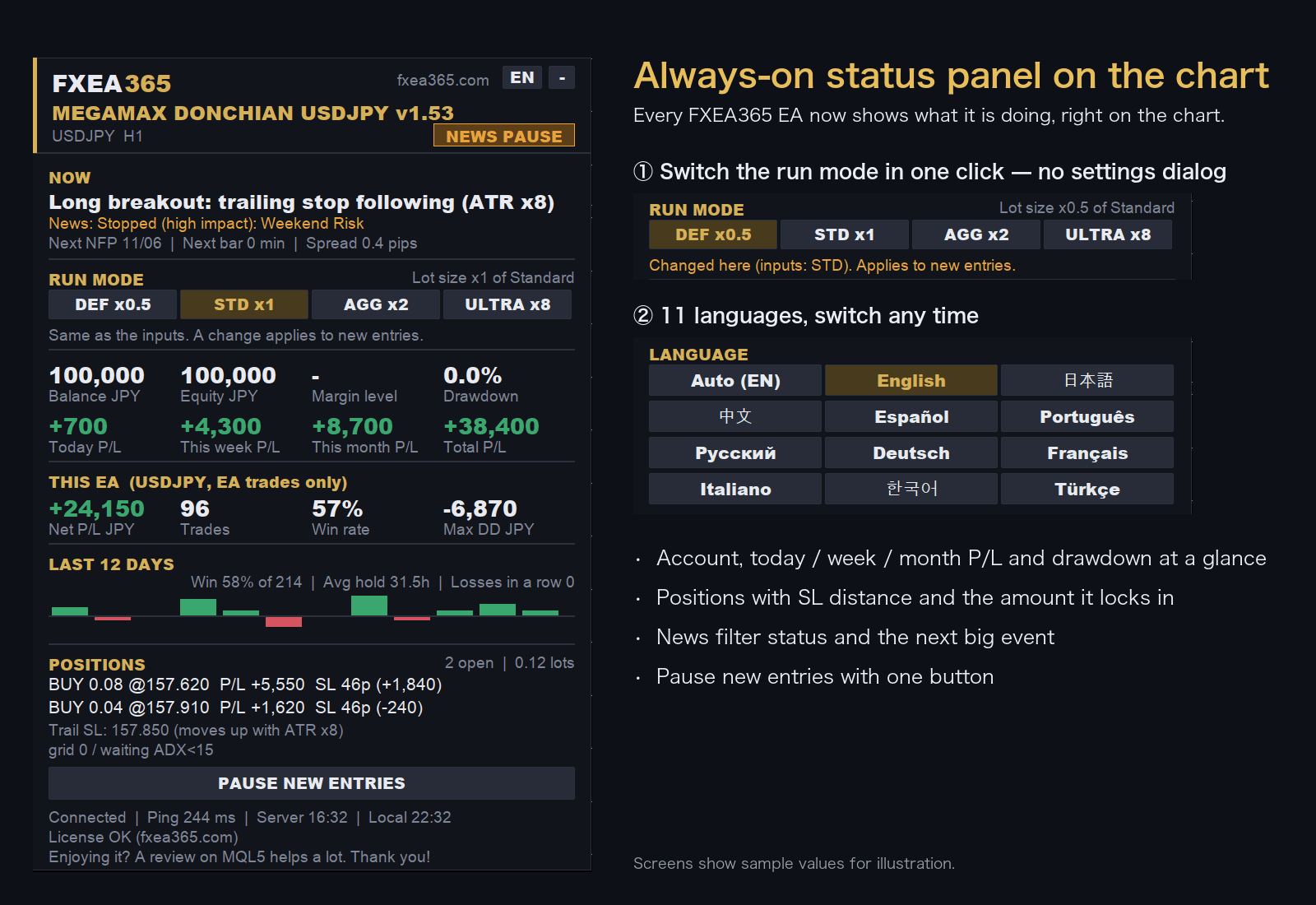
- Switch the run mode with a button on the chart (no need to reopen the settings)
- Choose the display language from 11 languages
- Live P/L, maximum drawdown and EA net profit
- Open positions with distance to SL
Screens show sample values for illustration.
All Parameters
All 49 inputs shown in MT5 (EA core + shared modules). Strategy-core values are pre-optimized — keep them at defaults; tune only the operational ones as needed.
| Parameter | Default | Description |
|---|---|---|
| General | ||
VersionCheck_Enable | true | Enable automatic update notifications. |
EA_Slug | gold-queen-v3 | FXEA365 site EA identifier (do not change). |
| Economic Event Filter | ||
EconFilter_Enable | true | Avoid trading around high-impact economic events. |
EconFilter_AvoidNFP | true | Avoid NFP (1st Friday each month). |
EconFilter_AvoidFOMC | true | Avoid FOMC (US Federal Open Market Committee). |
EconFilter_AvoidCPI | true | Avoid CPI (US consumer price index). |
EconFilter_AvoidWeekend | true | Avoid weekend risk (late Fri / early Mon). |
EconFilter_AvoidHoursBefore | 2 | Avoid N hours before the release. |
EconFilter_AvoidHoursAfter | 1 | Avoid N hours after the release. |
EconFilter_ServerGMTOffset | 3 | Server-time GMT offset (summer=3 / winter=2). |
EconFilter_Verbose | false | Verbose filter logging. |
EconFilter_UseCalendar | true | Auto-fetch from MT5 economic calendar (falls back to NFP/CPI rules where unavailable). |
EconFilter_MinImportance | 2 | Min calendar importance (1=low+ / 2=medium+ / 3=high only). |
EconFilter_Currencies | USD | Calendar target currencies (CSV, e.g. USD,EUR,JPY). |
EconFilter_StopImportance | 3 | Fully stop new entries at this importance or above. |
EconFilter_StopBeforeMin | 120 | Stop: N minutes before release. |
EconFilter_StopAfterMin | 60 | Stop: N minutes after release. |
EconFilter_ReduceLotFactor | 0.5 | Lot factor on medium impact (reduce instead of stop). |
EconFilter_ReduceBeforeMin | 30 | Reduce lot: N minutes before. |
EconFilter_ReduceAfterMin | 15 | Reduce lot: N minutes after. |
| Safety Guard | ||
Guard_Enable | true | Enable the safety guard (forward only). |
Guard_EmergencyMargin | 120.0 | Close all if margin level falls below this % (0=off). |
Guard_DailyLossPct | 8.0 | Stop new entries for the day at this daily loss % (0=off). |
Guard_DailyLossClose | false | Also close open positions when the daily loss is hit. |
Guard_MaxConsecLoss | 0 | Stop new entries for the day after N consecutive losses (0=off). |
Guard_FridayClose | false | Close everything late Friday. |
Guard_FridayCloseHour | 20 | Friday close-all hour (server time). |
| News Protect (pre-event position protection) | ||
Guard_NewsProtectMode | 0 | 0=off / 1=SL to break-even / 2=half close / 3=close all. |
Guard_NewsProtectMin | 15 | Run protection N minutes before high-impact events. |
| Dashboard / Notify | ||
Notify_Push | true | MT5 mobile push notifications (requires MetaQuotes ID). |
Notify_Email | false | Email notifications (requires MT5 email setup). |
Notify_WebhookURL | — | Generic webhook URL (Discord/Slack, etc.; empty=off). |
Notify_MarginAlert | 150.0 | Alert when margin level falls below this %. |
Notify_DailySummary | true | Send a daily summary at a set time. |
Notify_SummaryHour | 6 | Daily summary send hour (server time, 0-23). |
Dash_TradeCSV | true | Record all fills to CSV (MQL5/Files). |
Dash_PauseButton | true | Show a pause button on the chart. |
Notify_NewsPrewarnMin | 60 | Pre-warn N minutes before entries are halted (0=off). |
DetailedLog | true | Logs wait/skip reasons, entries and exits to the Journal (forward only). |
LogVerbose | false | Verbose tier: log every-bar evaluation detail |
| Risk Preset | ||
InpRiskMode | GK_ULTRA | Risk preset (verified configs; Ultra = published backtest) |
InpEmergencyML | 70.0 | Emergency close-all if margin level %% falls below this (active in tester too; final blow-up guard; 0=off) |
LotPer1k | 0.010 | Manual mode: lot per $1k balance |
InpMaxBaskets | 1 | Concurrent baskets per slot (1 = legacy behaviour, 2-4 = multi-basket, frees up occupied slots) |
InpHourShift | -99 | -99 = auto (derive EET-based shift from the server GMT offset). Cross-broker seed-hour correction: hour+shift. Exness (GMT+0) needs +2..+3 to match MetaQuotes (EET) time |
MaxSpreadUSD | 1.00 | |
MagicBase | 9500 | |
Slippage | 50 | Allowed slippage (points). |
InpAddWindowMin | 40 | |
Defaults and descriptions follow the EA source. Lot inputs show the effective value after the run-mode multiplier (Defensive x0.5 / Standard x1.0 / Aggressive x2.0). See the bundled MANUAL.html for details.
EA Setup Guide
- Copy to the MQL5/Experts folderCopy the .ex5 file to the MQL5/Experts folder inside the MT5 data folder (File > Open Data Folder)
- Allow fxea365.com in MT5 WebRequest settingsIn MT5 open Tools → Options → Expert Advisors, tick "Allow WebRequest for listed URL", add https://fxea365.com and press OK. The EA checks your account licence there on start-up; without this it stops with "code=4014"
- Attach the EA to a chartOpen the chart for the target currency pair, drag the EA from the Navigator panel onto the chart, check "Allow Algo Trading," and click OK
- Turn on the Algo Trading buttonTurn on the "Algo Trading" button (green) in the MT5 toolbar. A smiley face (😊) in the top right of the chart means it is running
How to Set Up an EA in MT5 | From Installation to Operation →
Free download (register your account number)
STEP 1 Prepare your account
Using the EA requires an MT5 account opened through our referral link. If you already have an account, please create an additional account.
No account yet — open a new account via the links below
Adding an account — create an additional account in your member pageSee how →
Buy the paid version (MQL5 Market, no account registration)
Buy GOLD KING v6 EA
Buy on the official MetaQuotes Market (MQL5 Market). Payment, licensing and automatic updates are all handled inside the MT5 app.
Check the MQL5 product listing for current pricing, rental terms and availability.
Buy on MQL5 Market (MT5) →Buy on MQL5 Market (MT4) →Buy on the official MetaQuotes Market — install directly in MT5 with automatic updates. No account registration needed.
Compare the available free distribution first
The free distribution may have separate eligibility and registration requirements. Review those terms before choosing the MQL5 edition.
Review free-download requirements →Before you buy
- Check MT4/MT5 compatibility and the current price on the MQL5 product page.
- Free-distribution and MQL5 editions may have different license terms; verify before purchase.
- Backtest results do not guarantee live returns. Review maximum drawdown and the test period.
Frequently asked questions
- What is the difference between the free and paid versions?
- The free version works once you register the number of an Exness, XMTrading or HFM trading account opened through our referral link. The paid version is a one-time purchase on MQL5 Market and needs no account registration. For some EAs the version or default settings differ between the two (see the version shown on each page).
- What happens if I change accounts?
- The free version runs only on the account number you registered. To use it on another account, register again with that account number.
- Can I backtest it?
- Yes. The MT5/MT4 Strategy Tester does not check the account, so you can test on any account type.
- Can I use it on a demo account?
- No. The free version runs only on the registered live trading account. Use the Strategy Tester to check how it behaves.
- What if the EA does not trade?
- See "Common problems and fixes" in the setup guide. How to Set Up an EA in MT5 | From Installation to Operation →
Articles about this EA
GOLD_KING v3 vs. a $1,999 Gold EA: 5 PDCA Cycles
5 PDCA cycles took PF from 0.31 to 3.67 in a 7-year MT5 test. Free FXEA365 GOLD_KING v3 vs. a $1,999 gold EA: half the DD, open source (at the time), failure protection.
Best MT5 EAs Compared (2026): Gold, Yen, Crypto
All fxea365 MT5 Expert Advisors in one table: XAUUSD, USDJPY, EURJPY, GBPJPY, BTCUSD and ETHUSD EAs ranked by PF, max drawdown and test period.
We Backtested 43 Popular Gold EAs on 11.5 Years of Real Data
We ran 43 best-selling paid gold (XAUUSD) EAs from the MQL5 Market through 11.5 years of MetaQuotes real data (2015–2026, 99% history quality), all on default settings. A $1,999 bestseller lost 99% of the account, price had zero correlation with quality, and 40% genuinely survived. Full named ranking and methodology inside.
Price action auto trade bot Review: PF 1.72, Max DD 34.83%
We backtested the MQL5 EA Price action auto trade bot under the same conditions as our own EAs (Jan 2020 – Feb 2024, $10,000, 1:500, 100% real ticks, default settings): PF 1.72, max DD 34.83%, 91 trades. Comparison with our EAs, full conditions and limitations — facts only.
XAUUSD EA Settings: Risk, MaxSpread, SL, Time Filter
Set up a gold EA for your broker: check the symbol spec, set MaxSpread in points (not pips), use an ATR-based SL such as 1.5×ATR(14), then RiskPercent.