
MT5 · RULES + AI · BACKTESTABLE
AIFW – AI Framework for MT5
Rules by default, AI on top. An EA you can backtest, with a monthly API budget you set yourself.
WHAT IT IS
What it is
An MT5 EA that uses OpenAI / Anthropic large language models as an override layer above a deterministic rules engine. The rules engine runs with no API key, no balance and no network. Only when the AI answers is its decision adopted, and only inside the limits set by the rules.
WHAT IT DOES
What it does
- Default decision layer: H1 moving-average trend (optional H4 agreement) + M15 RSI cross + ATR-relative SL/TP. Every new position carries a stop-loss.
- AI override: at a fixed interval it sends a market summary and receives a hold / open / close / modify proposal.
- AI gate: AI entries execute only when they agree with the rules trend. SL/TP are re-placed at the same ATR-relative distance the rules use. The same direction is blocked for a while after a stop-loss.
- Monthly cap: set a monthly API budget in USD. Near the cap the decision interval widens; at the cap API calls stop. Trading continues on the rules engine.
- Backtesting: live responses are recorded, and the tester replays the recording for the same situation. Where no recording exists, the rules engine decides. The tester shows the share of exact / approximate / rules decisions.
- Terminal-side safety limits: open positions, max lot, executions per day, cooldown, retreat on daily loss and drawdown, sessions, weekend stop, spread cap, pause around news, max holding time, break-even, trailing, partial close. It keeps running without the AI.
- Approval mode: instead of auto-execution, review each proposal on the panel before it executes.
- On-chart panel in 30 languages. Your API key is stored only on your terminal.
PANEL
Panel
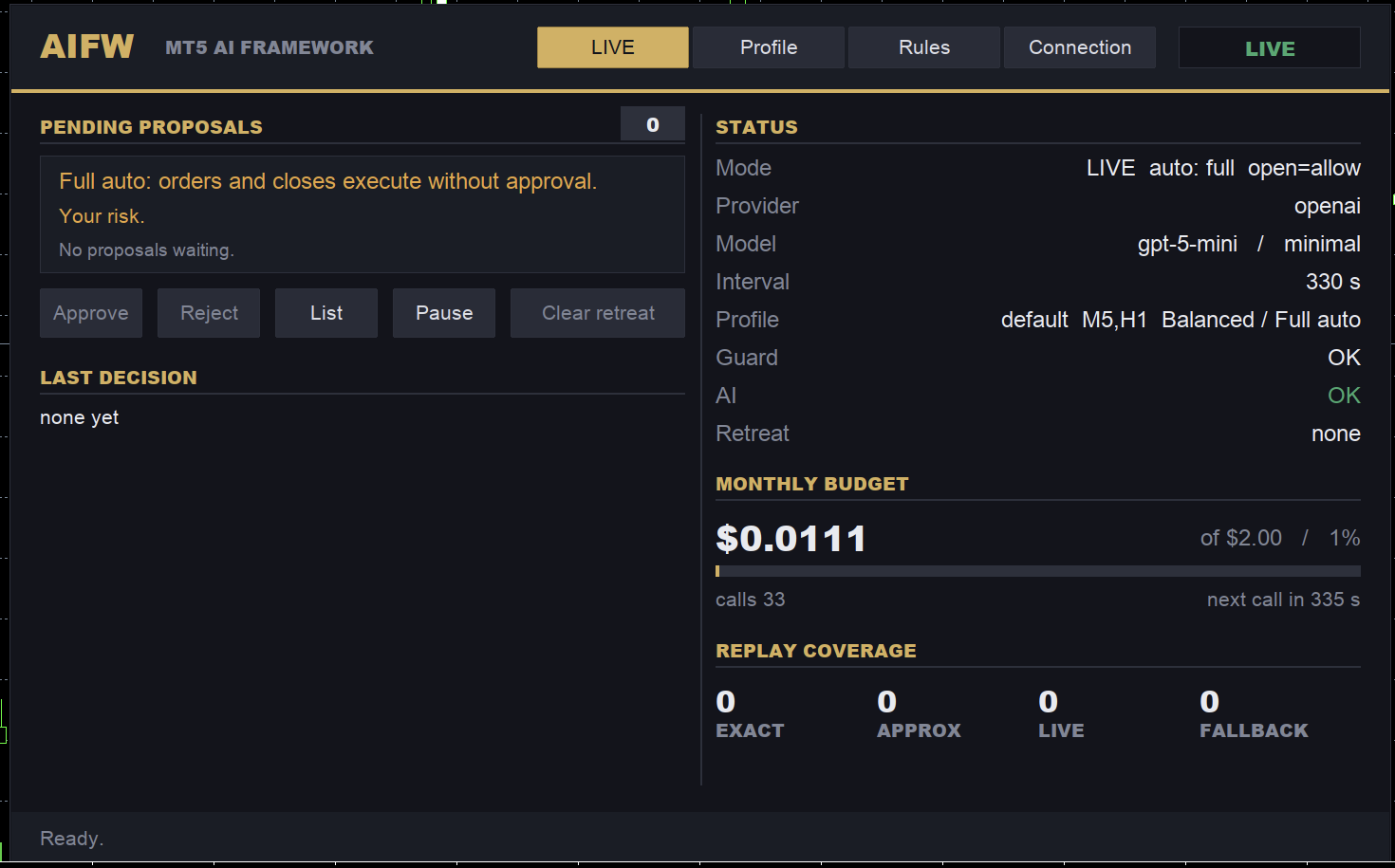
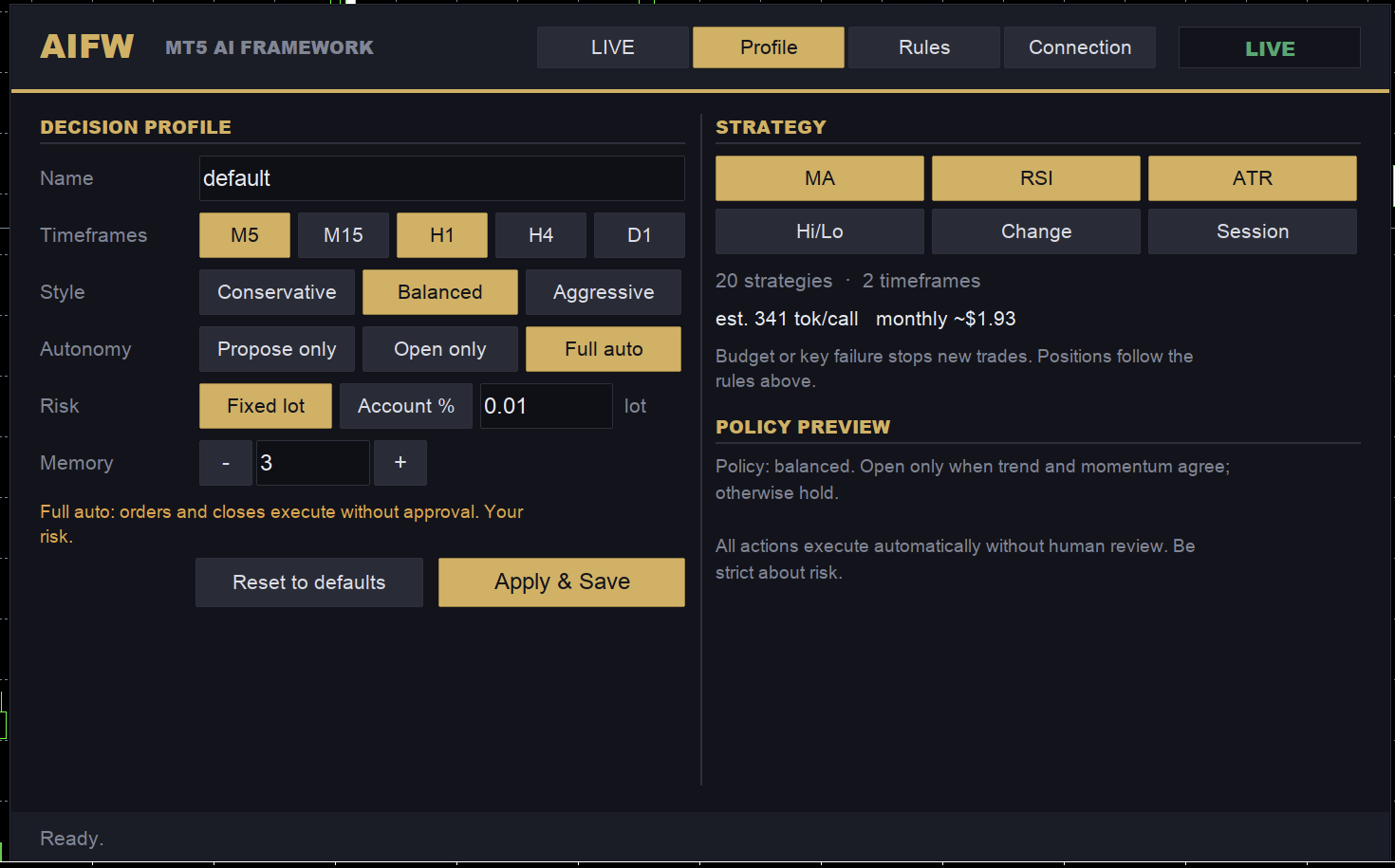
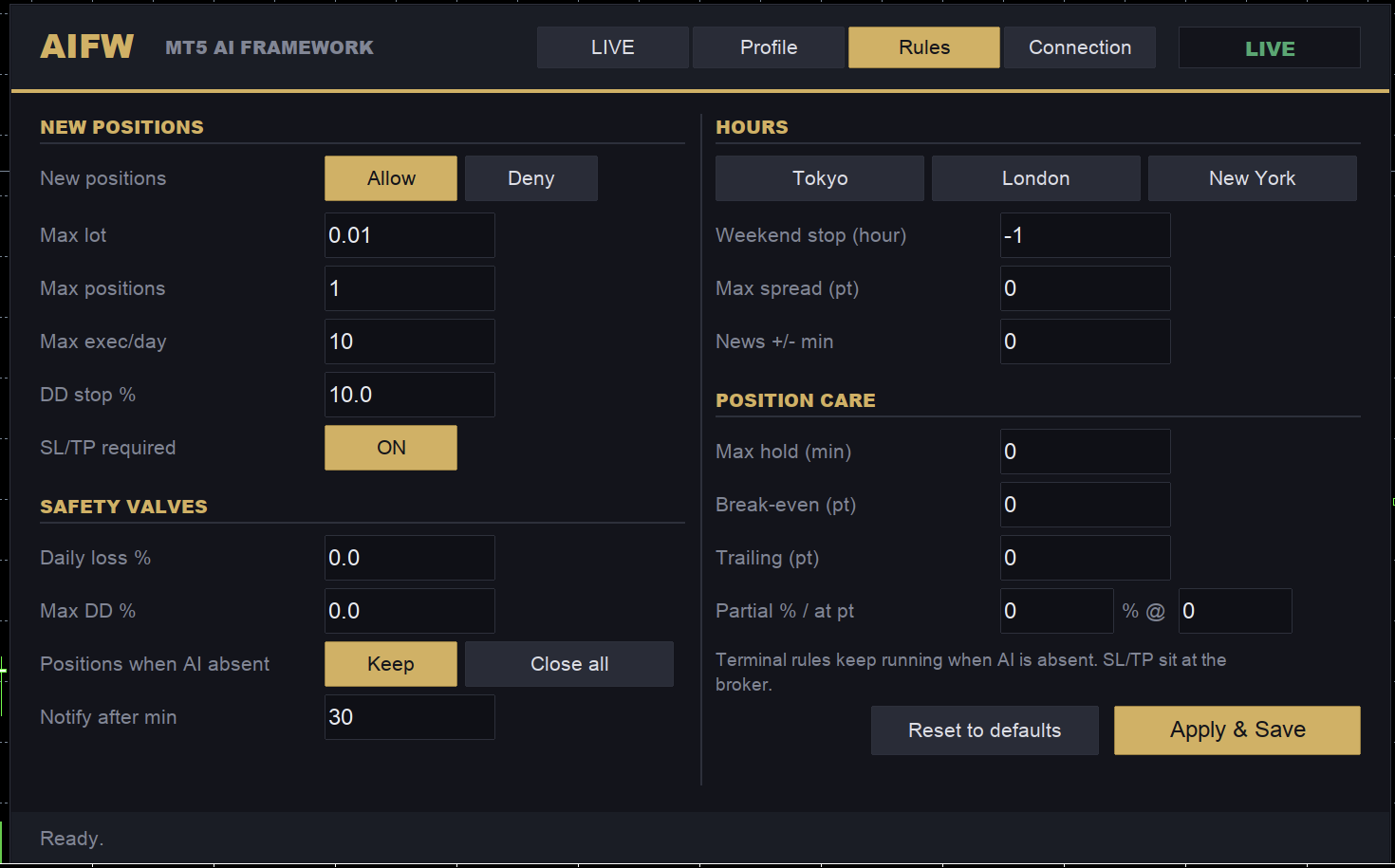
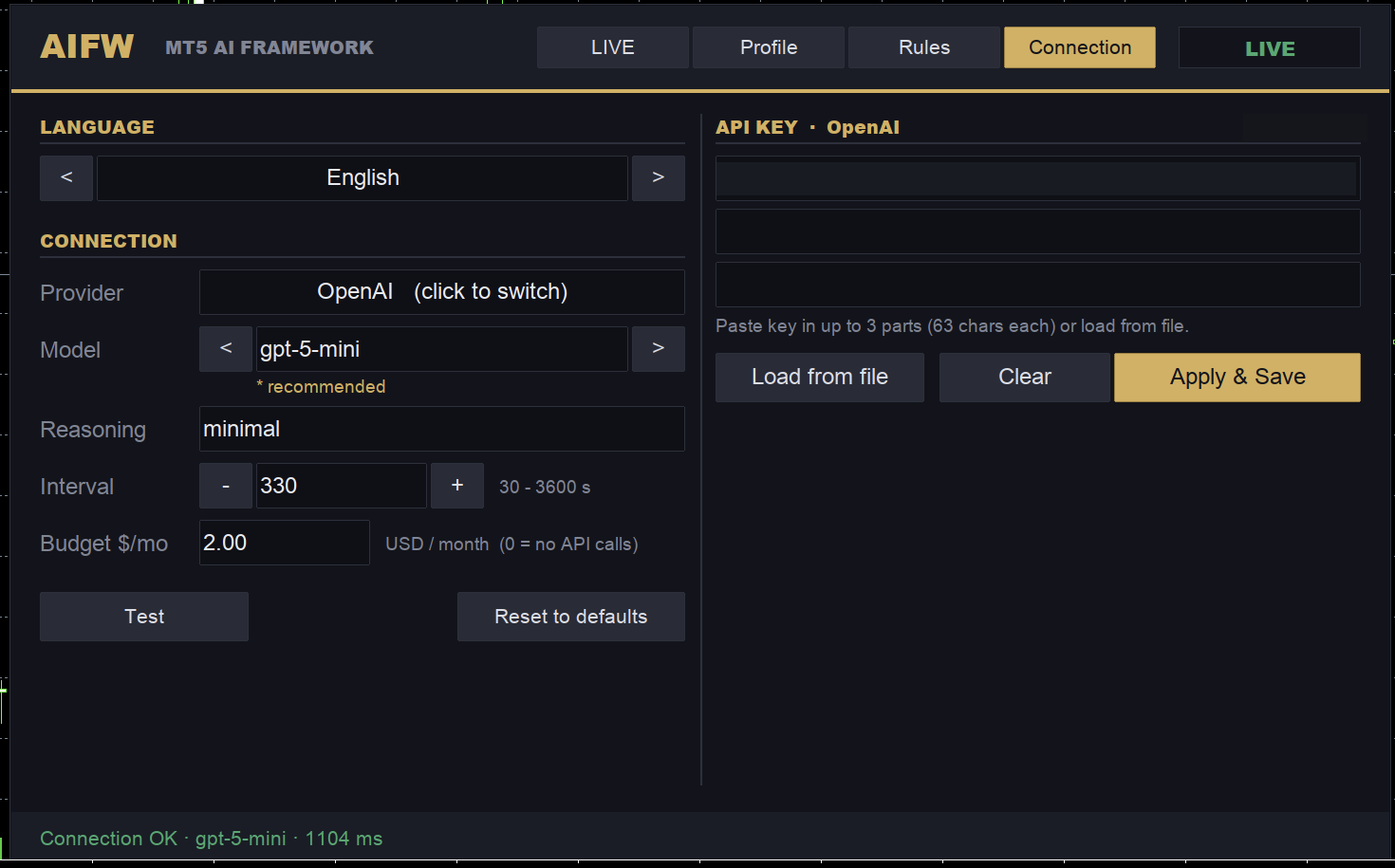
Four tabs: LIVE / Profile / Rules / Connection. Captured on a demo account.
⚠ What it does not do or promise
- No profit promise. Rules and AI are tools; results depend on the market, the model, the profile and your settings.
- Data goes to no one except the API provider you choose. No license server, no telemetry, no auto-update.
- We do not claim that AI reduces risk. Risk limits are enforced by the terminal-side rules.
REQUIREMENTS
Requirements
MT5 (build 4000 or later). To use the AI: an OpenAI or Anthropic API key, and api.openai.com or api.anthropic.com added to the allowed WebRequest URLs in MT5. A VPS if you want it running around the clock.
STRATEGY TESTER
About the Strategy Tester
The tester cannot call external APIs. With a recording it replays; without one it runs the rules engine. Tester results are the rules engine plus your own recordings, not the future performance of the AI.
FIRST SETUP
First setup
- Attach to one chart (for example XAUUSD M5). Keep the default inputs.
- On the Connection tab pick the provider and model, paste your key, set the monthly cap and save.
- Keep auto-approve off for the first few days and review proposals by hand.
- Once recordings accumulate, replay them in the tester.
MANUAL
Manual
How to set up the AI and what to do when the panel shows red text. Without the AI there is nothing to set up: the rules engine runs on its own.
1. Allowed WebRequest URLs (required for the AI)
- In MT5 open Tools > Options (Ctrl+O) and select the Expert Advisors tab.
- Tick "Allow WebRequest for listed URL".
- Double-click the empty row and add your provider: https://api.openai.com for OpenAI, https://api.anthropic.com for Anthropic. Add both if you switch.
- Click OK. No EA reload is needed.
The list is per terminal. On a VPS repeat this in the VPS's MT5. The Strategy Tester cannot use WebRequest at all (MT5 design).
2. Entering the API key (Connection tab on the panel)
- Click Provider to switch between OpenAI and Anthropic, and pick the model marked ★ recommended. For gpt-5 models set Reasoning to minimal.
- Keys are 100–160 characters and one MT5 field holds at most 63. Paste the key into up to three fields in order, or save it as one line in MQL5/Files/aifw/api_key.txt and click Load from file.
- Set the monthly budget (USD) and click Apply & Save. Keys are stored per provider, so switching does not require re-entering them.
- Click Test. A green "Connection OK · model · ms" in the footer means you are done. If it is red, use the table below.
3. Where settings and recordings live (File > Open Data Folder)
- MQL5/Files/aifw/panel_settings_<SYMBOL>.txt: panel settings (key in plain text). Terminal-local.
- Common/Files/aifw/budget_state.csv: this month's spend. Survives restarts.
- Common/Files/aifw/: recorded live replies. The tester replays from here. Copy the folder when you move terminals.
4. Red panel messages and fixes
| Panel text | Fix |
|---|---|
| key not set | Enter the key on the Connection tab and Apply & Save. Rules trading continues meanwhile. |
| URL not allowed · check terminal options | The host in brackets is missing from the allowed list (error 4060). Add it as in step 1. |
| key rejected · update on Connection tab | HTTP 401/403. Paste the key again and check that provider and key match. |
| no credit · check billing | HTTP 402 or billing not set up. Check payment settings and balance in the provider console. |
| rate limited · retrying | HTTP 429. Retries automatically. If frequent, widen the interval. |
| model unknown · change on Connection tab | HTTP 404 / invalid model name. Switch back to the ★ recommended model. |
| network failed N times | Host unreachable, timeout or another HTTP error. Read the AIFW: log line for the code. Check the VPS firewall. |
| bad reply N times | Reply not parseable. Change the model. For gpt-5 set Reasoning to minimal. |
| budget cap · resumes on the 1st | Monthly cap reached. By design. Raise it on the Connection tab and save if you want. |
| pricing not set · set in inputs | Enter your provider's published prices (USD per 1M tokens) in the inputs InpPriceInPerMTok / InpPriceOutPerMTok. While 0, AI calls stay disabled. |
| Apply & Save first, then test. | Unsaved changes. Click Apply & Save, then Test. |
| Test failed · … | Host unreachable, timeout or another HTTP error. Read the AIFW: log line for the code. Check the VPS firewall. |
| Connection OK · … | Click Test. A green "Connection OK · model · ms" in the footer means you are done. If it is red, use the table below. |
Details are printed in MT5's Toolbox > Experts tab as lines starting with AIFW: (keys are masked). Include that line when asking for support.
FAQ
FAQ
- Does it work without a key?
- Yes. It decides on the rules engine alone.
- How much does the API cost?
- You set the cap. The default is small. Calls stop once it is reached.
- Which models?
- The main OpenAI and Anthropic models. The recommended model is shown on the panel.
- Are backtest numbers the AI's skill?
- No. They come from replayed recordings and the rules engine.
GET IT
Get it
Sold only on MQL5 Market. Payment, licensing and updates are handled by MetaQuotes.
Buy AIFW
Buy on the official MetaQuotes Market (MQL5 Market). Payment, licensing and automatic updates are all handled inside the MT5 app.
🏷 Launch pricing now — the price steps up every 3 copies sold. The earlier you buy, the lower the price.
Buy on MQL5 Market →Buy on the official MetaQuotes Market — install directly in MT5 with automatic updates. No account registration needed.
This page explains how the product works and is not an indication of future returns. Tester results come from replayed recordings and the rules engine, not from the AI.
Ready for a paid EA?
Once you're comfortable with the free tools, our tick-tested paid EAs are available on the MQL5 Market. Try free first, then decide.
See all products on MQL5 Market