
The free version runs on a live Exness, XM or HFM account opened through our links and registered with us (it does not start on demo accounts; you can check how it works in the Strategy Tester). The paid version is sold on MQL5 Market and needs no account registration.
ATLAS
5-Asset Diversified Trend EA
Real-tick BT 2019.01–2026.06 / 5 assets compounding in one account
7.5 years, zero losing years
CAGR 68.8% (single account, compounding, 2026 through June)
Trend-following endures small losses while waiting for a trend; crypto is volatile. Invest at your own risk.
⚡ Min deposit: ~$670 (standard) / micro account for small or conservative sizing
Verification Status
How far verification has progressed, from backtest to forward testing
- BacktestDone
- Period
- H4 (2019.01.01 - 2026.06.28)
- History quality
- 100%
- Trades
- 1193
- PF
- 1.48
- Max DD (relative, equity)
- 26.29% (equity DD at the largest loss in money terms: 19.74%)
- Recommended minimum capital
- $1,000+ recommended
- OOSDone
- Data source
- MT5 official ticks
- Years verified
- 7.5
- ForwardIn progress
This EA is in forward testing. Results for all EAs are published together on the forward test page.
See all forward tests → - LiveNot started
How it works
ATLAS runs five low-correlation markets at once from a single EA. USDJPY/GBPJPY/EURJPY use the MEGAMAX engine (buy-only Donchian breakout + hard ATR stop + ATR trailing + time exit); BTC/ETH use the COMET engine (Donchian breakout + SMA200 trend filter + ATR trailing). Each asset uses its validated engine. No grid, no martingale, no averaging — the trend engines hold one position per symbol (from v1.49 a separate Monday-open sleeve can add one short-lived buy on each JPY pair), each with a stop-loss (the crypto legs' stops are executed by the EA, not placed on the broker's server). The FX (yen-weakness) and crypto (risk-on) sleeves are near-uncorrelated (~0.05), so the blended drawdown is lower than any single market, and the equal-weight 2018-2026 year-by-year combination was positive in all nine years (no losing year).
Entry & exit timing
- MEGAMAX legs (JPY): buy when the closed bar closes above the N-bar Donchian high; a hard SL (SL_ATR×ATR) is set at entry.
- COMET legs (crypto): take breakouts beyond an ATR confirmation buffer only in the SMA200 slope direction; skip over-extended breakouts.
- Exit: no fixed take-profit. The stop trails at an ATR-multiple distance as price advances. MEGAMAX legs also time-exit after a max holding period.
- Monday sleeve (v1.49, JPY pairs): one buy per pair at 01:00 broker server time on Monday, closed at 02:00. A hard 50-pip SL is sent to the broker with the order; skipped if the spread stays above 3.5 pips for 30 minutes.
- Trend engines: one position per symbol, long-biased (JPY/ETH long-only, BTC both directions), no grid/martingale.
Real-broker backtest
Exness real feed · $10k · RiskPercent 1.0 · each leg validated individually (MT5 tester runs one symbol). Basket = equal-weight annual.
Portfolio yearly (no losing year)
Component legs (2018-2026 / r1.0)
| Asset | Engine | PF | DD |
|---|---|---|---|
| USDJPY | H1 · MEGAMAX | 1.46 | 11.7% |
| GBPJPY | H4 · MEGAMAX | 1.68 | 10.9% |
| EURJPY | H1 · MEGAMAX | 1.45 | 11.9% |
| BTCUSD | H4 · COMET | ~3.0 | ~3% |
| ETHUSD | H4 · COMET (long) | ~2.2 | ~7% |
* 2026 partial (to June). The three JPY legs are also positive in both halves on a 2nd broker (HFM). Backtests do not guarantee future results.
New in v1.49: Monday-open sleeve (JPY pairs)
MT5 Strategy Tester "Every tick based on real ticks" · MetaQuotes-Demo · JPY legs only · Standard · 2023.01–2026.09 · $10,000
| Net | PF | Bal. DD | Eq. DD | RF | |
|---|---|---|---|---|---|
| v1.47 (no sleeve) | +$17,997 | 1.23 | 22.04% | 24.04% | 2.37 |
| v1.49 (with sleeve) | +$20,600 | 1.23 | 21.78% | 22.29% | 2.73 |
The sleeve shares the existing margin and guard checks and does not change the trend legs (with the sleeve off, a regression test reproduced all 1,164 deals of v1.47 exactly). The five-asset and yearly figures below were measured before the sleeve and are left unchanged.
📈MT5 Strategy Tester Report — ATLAS
📋 About this report
- Official report generated by the MT5 Strategy Tester (real-tick data)
- Multi-year real price data with the every-tick (real ticks) model
- Balance curve (blue) / Equity curve (green) shows floating losses too
- Past results do not guarantee future profits
Real-Tick Verification
We verify our EAs on real ticks — and publish what we find.
We real-tick tested 800+ market EAs: ~70% blew up, and most survivors were phantoms built after the test window. We publish the raw reports and their history quality — good numbers and bad.
Read the verification report →
Where it struggles / key risks
- When all markets chop sideways at once, trend-following bleeds small losses.
- Crypto gaps and spikes; a single leg's DD can spike (diversification cushions the whole).
- The MT5 tester runs one symbol at a time; the full 5-asset basket only appears on a live account (test each leg separately).
Parameters (.mq5 order)
| Parameter | Default | Description |
|---|---|---|
| SymbolList | USDJPY,GBPJPY,EURJPY,BTCUSD,ETHUSD | 5 symbols (suffix auto-detected, missing auto-skipped) |
| EngineList | M,M,M,C,C | engine per leg M=MEGAMAX(JPY) C=COMET(crypto) |
| TFList | H1,H4,H1,H4,H4 | timeframe per leg |
| ChannelList | 40,20,20,20,15 | Donchian channel bars |
| TrailList | 8,6,10,2.75,5 | trail width (ATR mult) |
| ShortList | 0,0,0,1,0 | allow short (JPY/ETH long-only, BTC both) |
| HoldList | 60,300,200,0,0 | MEGAMAX time-exit bars (0=off) |
| BMList | 0,0,0,1.0,0.5 | COMET breakout confirm (ATR mult) |
| RiskList | 1.0,1.0,1.0,1.0,1.0 | risk % per leg (default equal-risk) |
| SL_ATR | 2.0 | MEGAMAX initial hard SL (ATR mult) |
| TrendSMA | 200 | COMET trend SMA period |
| MaxLot | 10.0 | hard lot cap per order |
| UseMondayFlow | true | Monday-open sleeve (JPY legs) on/off; false = identical to v1.47 |
| MF_EntryHour / MF_ExitHour | 1 / 2 | sleeve entry / exit hour on Monday |
| MF_ClockMode | 1 | clock: 0=GMT, 1=broker server time |
| MF_SLPips | 50 | sleeve hard SL (pips) |
| MF_RiskPct | 0.5 | sleeve risk % per trade (scaled by Run-Mode) |
| MF_MaxSpreadPips / MF_RetryMaxMin | 3.5 / 30 | max entry spread (pips) and wait (minutes) |
Always-on chart panel
Once the EA is on the chart, a panel shows its status at a glance.
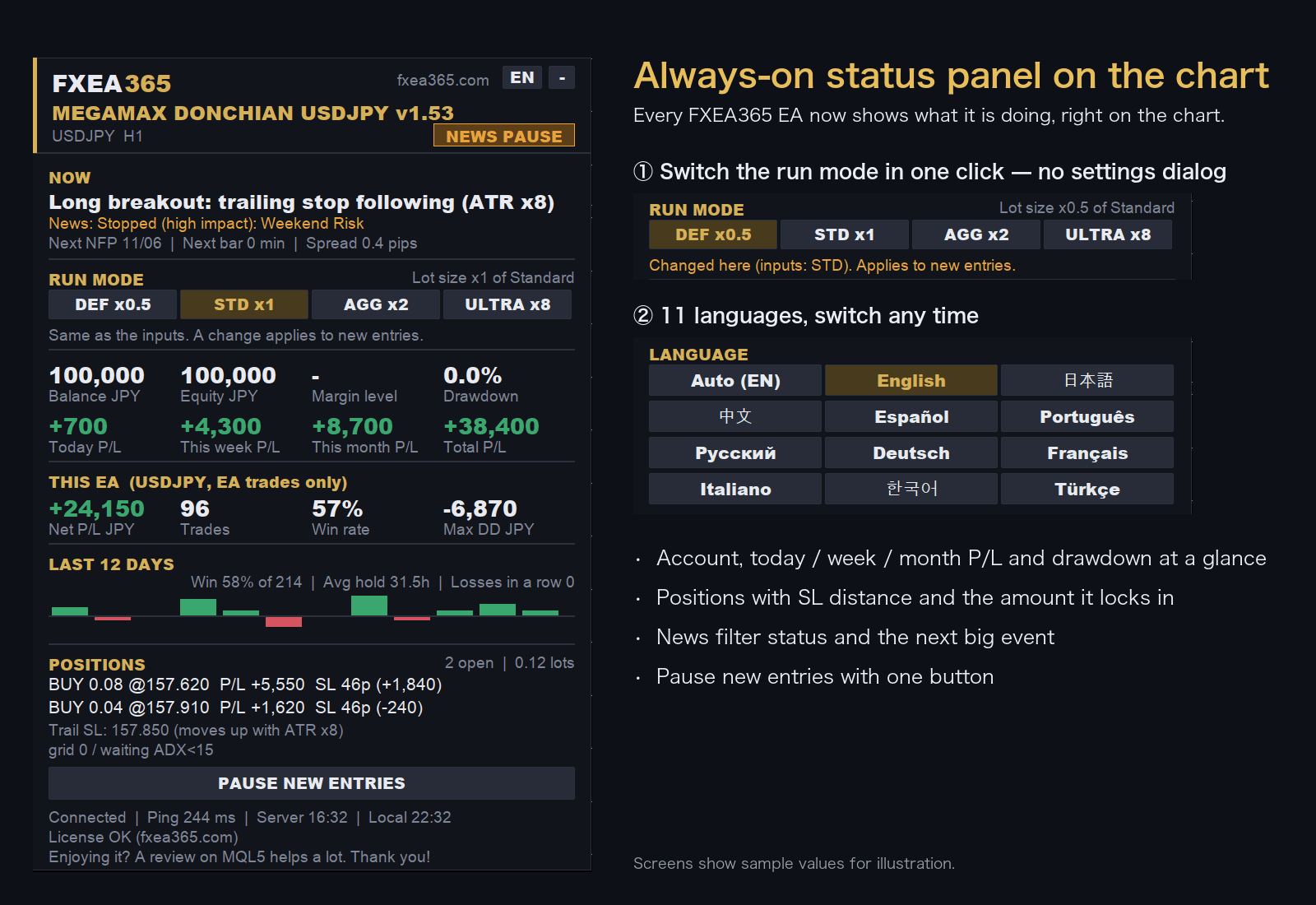
- Switch the run mode with a button on the chart (no need to reopen the settings)
- Choose the display language from 11 languages
- Live P/L, maximum drawdown and EA net profit
- Open positions with distance to SL
Screens show sample values for illustration.
EA Setup Guide
- Copy to the MQL5/Experts folderCopy the .ex5 file to the MQL5/Experts folder inside the MT5 data folder (File > Open Data Folder)
- Allow fxea365.com in MT5 WebRequest settingsIn MT5 open Tools → Options → Expert Advisors, tick "Allow WebRequest for listed URL", add https://fxea365.com and press OK. The EA checks your account licence there on start-up; without this it stops with "code=4014"
- Attach the EA to a chartOpen the chart for the target currency pair, drag the EA from the Navigator panel onto the chart, check "Allow Algo Trading," and click OK
- Turn on the Algo Trading buttonTurn on the "Algo Trading" button (green) in the MT5 toolbar. A smiley face (😊) in the top right of the chart means it is running
How to Set Up an EA in MT5 | From Installation to Operation →
Free download (register your account number)
Open an account with a supported broker and register your account number below. The EA only runs on the registered account (account-locked); download the MT5 / MT4 versions from your dashboard after registering.
STEP 1 Prepare your account
Using the EA requires an MT5 account opened through our referral link. If you already have an account, please create an additional account.
No account yet — open a new account via the links below
Adding an account — create an additional account in your member pageSee how →
Buy the paid version (MQL5 Market, no account registration)
Prefer not to open a broker account? Buy it outright.
Buy ATLAS Portfolio EA
Buy on the official MetaQuotes Market (MQL5 Market). Payment, licensing and automatic updates are all handled inside the MT5 app.
Check the MQL5 product listing for current pricing, rental terms and availability.
Buy on MQL5 Market →Buy on the official MetaQuotes Market — install directly in MT5 with automatic updates. No account registration needed.
Compare the available free distribution first
The free distribution may have separate eligibility and registration requirements. Review those terms before choosing the MQL5 edition.
Review free-download requirements →Before you buy
- Check MT4/MT5 compatibility and the current price on the MQL5 product page.
- Free-distribution and MQL5 editions may have different license terms; verify before purchase.
- Backtest results do not guarantee live returns. Review maximum drawdown and the test period.
Figures are historical backtests and do not guarantee future results. The basket figure is an equal-weight annual combination of individually-validated EAs. Invest at your own risk with money you can afford to lose.
Component EAs & related
Frequently asked questions
- What is the difference between the free and paid versions?
- The free version works once you register the number of an Exness, XMTrading or HFM trading account opened through our referral link. The paid version is a one-time purchase on MQL5 Market and needs no account registration. For some EAs the version or default settings differ between the two (see the version shown on each page).
- What happens if I change accounts?
- The free version runs only on the account number you registered. To use it on another account, register again with that account number.
- Can I backtest it?
- Yes. The MT5/MT4 Strategy Tester does not check the account, so you can test on any account type.
- Can I use it on a demo account?
- No. The free version runs only on the registered live trading account. Use the Strategy Tester to check how it behaves.
- What if the EA does not trade?
- See "Common problems and fixes" in the setup guide. How to Set Up an EA in MT5 | From Installation to Operation →
Articles about this EA
Best MT5 EAs Compared (2026): Gold, Yen, Crypto
All fxea365 MT5 Expert Advisors in one table: XAUUSD, USDJPY, EURJPY, GBPJPY, BTCUSD and ETHUSD EAs ranked by PF, max drawdown and test period.
EA Weekend Holding Risk and Friday Close Design
When an EA holds positions over the weekend, gaps can jump past your SL and swap costs can pile up. A developer's guide to implementing a Friday close, its side effects on performance, and what to check before you deploy it.
MagicNumber Design for Running Multiple EAs on One Account
If you run several EAs on the same account, duplicate MagicNumbers can't be ignored. This guide covers how EAs identify their trades, how to prevent interference, how to track partial closes, what happens when numbers collide, and a checklist to run before you configure anything.
Always Check the Worst Month in Your Backtest
When choosing an EA, look at the worst month in its backtest monthly results. This article explains how to decide whether to adopt an EA by asking if you could keep running it through that worst month three times in a row, how to read the monthly table, how to turn it into money management, and where the method falls short.
Same Trade Count, Different Reliability: Independence
Two EAs with the same trade count can differ in statistical reliability. Overlapping positions and correlated trades shrink the effective sample size. A developer's guide to what counts as independent and what to check in a backtest.