
MT5 Backtest Models: Every Tick vs Real Ticks vs 1 Minute OHLC
Contents
MT5 Backtest Models: 1 Minute OHLC vs Every Tick vs Every Tick Based on Real Ticks
When running a backtest in MT5's Strategy Tester, you will notice a setting called "Model." The model you choose has a significant impact on the accuracy of your results. For scalping EAs in particular, picking the wrong model leads to the classic problem of "looks great in backtests, fails completely in live trading."
The Four Backtest Models
MT5 Strategy Tester offers four price-modelling modes for testing an EA. (A fifth entry, Math calculations, loads no price history and is not a trade backtest.) Note that Every tick and Every tick based on real ticks are two different modes.
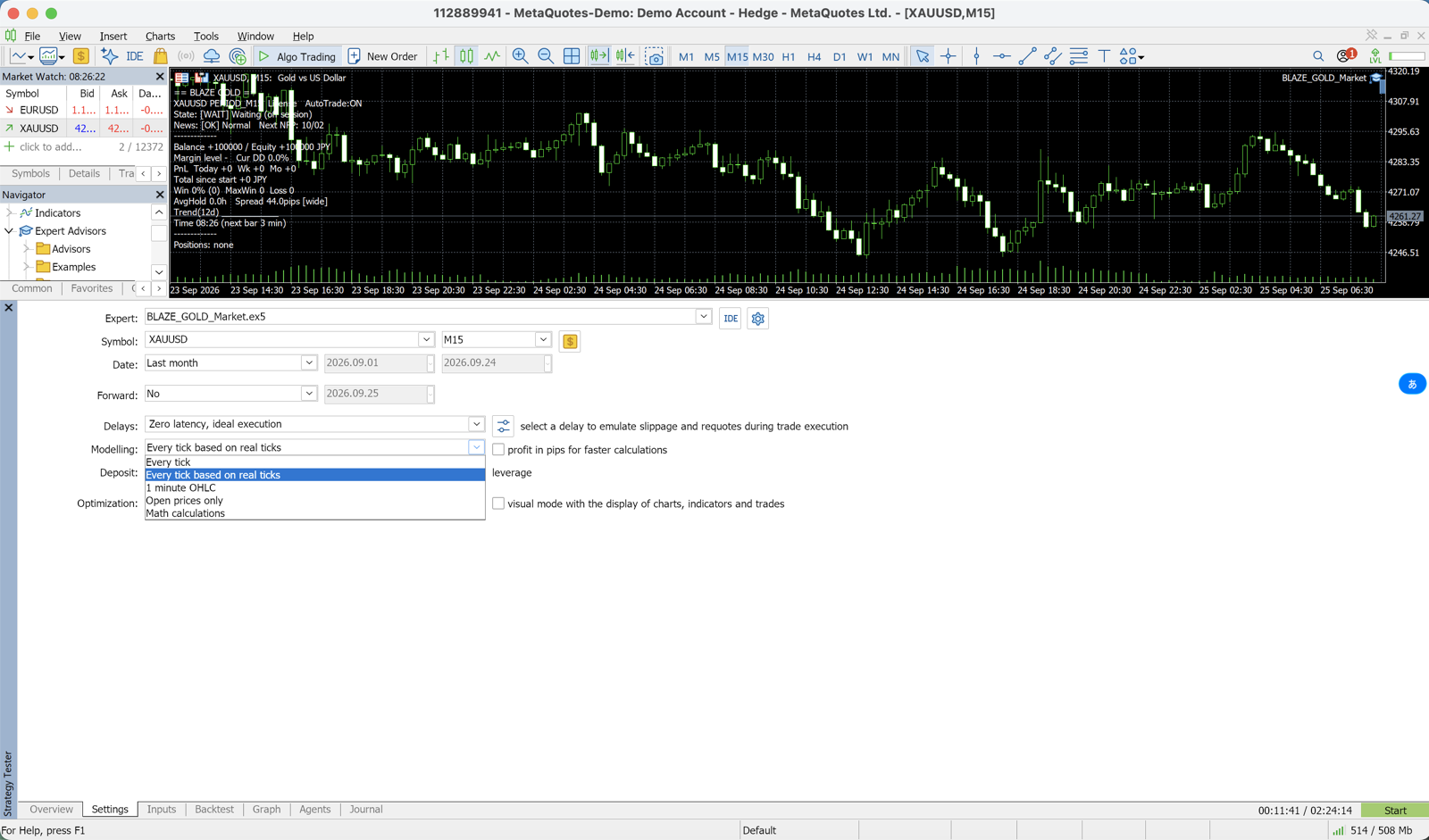
| Model | What the tester uses | Accuracy | Speed | Best for |
|---|---|---|---|---|
| Every tick | Ticks generated from 1-minute bars | High (ticks are simulated) | Slow | Final check when no real ticks exist for the period |
| Every tick based on real ticks | Ticks actually recorded by the broker | Closest to the live market | Slow (large tick download on the first run) | Scalping, grid and spread-sensitive EAs |
| 1 minute OHLC | Open, High, Low and Close of each 1-minute bar | Medium | Fast | H1/H4 swing EAs, optimization |
| Open prices only | Only the open of each bar on the tested timeframe | Rough | Fastest | EAs that act only on a new bar; quick first pass |
1. Every tick
The tester generates the ticks inside each 1-minute bar: the OHLC prices plus intermediate ticks. No recorded ticks are used.
- The most accurate of the generated modes, and slower than 1 minute OHLC
- The spread is fixed within each minute bar, so spread spikes inside a minute are not reproduced
- Despite the name, this is not real-tick testing
Recommended for: A final run when the broker has no real ticks for the period
2. Every tick based on real ticks
The tester replays the ticks the broker actually recorded. No simulation is performed.
- The spread changes inside a minute bar as it did in the market
- Minutes with no recorded ticks are filled with generated ticks (the Every tick method)
- Slow, and the first run downloads a large amount of tick data
Recommended for: Scalping strategies (M15 and below), grid EAs, strategies where spread impact is material
3. 1 minute OHLC
Only four prices of each 1-minute bar are used: Open, High, Low and Close.
- The path between those four prices is not modelled, so tight SL/TP and trailing stops are evaluated less precisely
- Much faster than the two every-tick modes
- Generally sufficient for H1/H4 swing strategies
Recommended for: H1 and H4 swing EAs, parameter optimization
4. Open prices only
The EA runs only once per bar, at the open of each bar on the tested timeframe.
- The fastest and the roughest mode
- The EA cannot read data from a timeframe lower than the tested one
- Meaningful only for EAs that make decisions on a new bar
Recommended for: Quick sanity checks only — not suitable for serious validation
Recommended Broker Comparison →
🎁 Download Free EA📧 Free 8-email course + subscriber-only pack of 13 MT5 indicators
Right after you sign up, you get a download link for a subscriber-only pack of our 13 MT5 indicators: compiled files (.ex5), source code and a setup guide. Then 8 emails on algo-trading essentials, reading backtests correctly and choosing a broker (one a day for the first 5 days, then 7, 14 and 30 days after signing up). You also get notified before each price rise of the versions sold on the MQL5 Market (launch pricing that steps up as copies sell). Our EAs are free on this site with a live account at a partner broker.
* Privacy strictly protected. You can unsubscribe at any time.
Why Scalping EAs Require Real Ticks
Backtesting a scalping EA (M15 or below) with the 1-Minute OHLC model introduces the following problems.
Problem 1: SL and TP Hit Order Becomes Ambiguous
In the real market, it matters whether the high or low of a bar was reached first. With 1-Minute OHLC, the sequence of High and Low within a single minute is unknown, so the model cannot accurately determine "did the SL get hit first, or did the TP?"
Example: Price movement within one minute
  Reality:  High reached first → then price falls (TP triggered before SL)
  OHLC model: High=TP level, Low=SL level — the order is unknown
Because scalping trades have SL and TP placed close together, this ambiguity has a large impact on simulated performance.
Problem 2: Spread Spikes Are Not Reproduced
The 1-Minute OHLC model does not replicate the sudden spread widening that occurs around major news releases. Since scalping strategies are the most sensitive to spread, backtests run with a fixed spread will produce overly optimistic results.
How to Download the Data You Need for Backtesting
Before MT5 can run a backtest, the historical data must be downloaded to your terminal.
Step 1: Let MT5 Download the History
- Launch MT5 and log in to your broker account
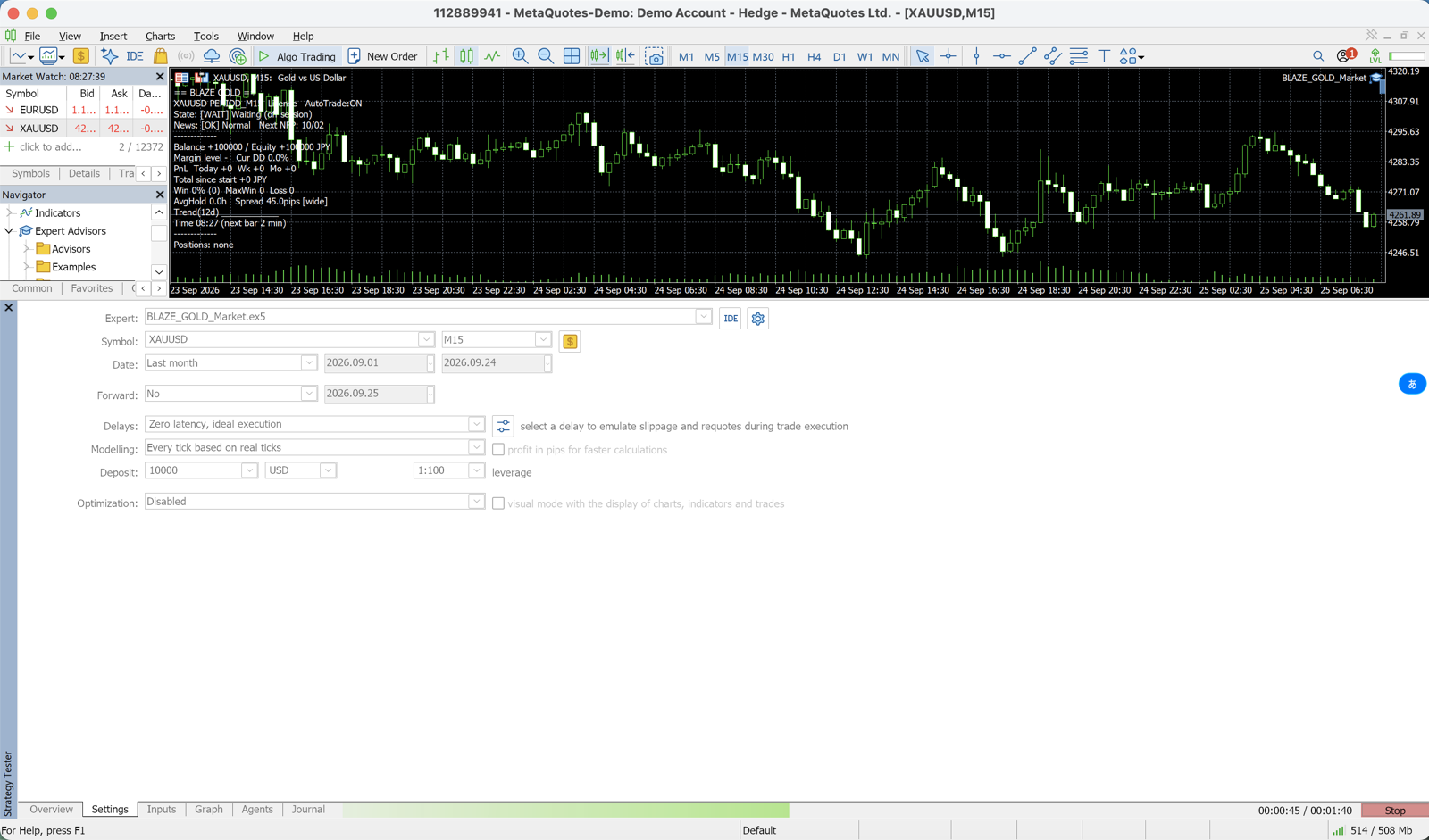
- Open the Strategy Tester (Ctrl+R) and choose the symbol, timeframe, period and model
- Press Start — the tester automatically downloads the available price history of the symbol from the broker's server
- With Every tick based on real ticks, the first run also downloads tick data, which can take a long time
- To inspect the stored data yourself, open View → Symbols (Ctrl+U) and use the Bars and Ticks tabs
Step 2: Check History Quality
After the run, open the report in the Strategy Tester and look at the History Quality line.
With Every tick based on real ticks:
  minutes with recorded ticks    → real ticks are replayed
  minutes without recorded ticks → ticks are generated (same as Every tick)
Brokers often keep real ticks for only part of a long period. A low History Quality figure is a sign that much of the test did not run on real ticks even though the real-tick model was selected, so always read that figure together with the results.
Recommended Backtest Settings for EAs on This Site
| EA | Timeframe | Recommended Model | Reason |
|---|---|---|---|
| DONCHIAN ENGINE / MEGAMAX DONCHIAN | H1 | 1-Minute OHLC or better | 1-Minute OHLC is generally sufficient for H1 swing strategies (DONCHIAN ENGINE's listed figures were verified with Dukascopy real ticks) |
| GOLD VIPER / GOLD NEURON | M30 | 1-Minute OHLC or better | Same as above |
| BITCOIN COMET | H4 | 1-Minute OHLC | 1-Minute OHLC is sufficient for H4 swing strategies |
| GOLD KING v6 | M1 | Every tick based on real ticks | An M1 grid EA requires real tick data (note: our published Exness 7.5y backtest has history quality 5%, so it is not a real-tick verification) |
Estimated Backtest Processing Times
Environment: Core i5 equivalent, 8 GB RAM, SSD, XAUUSD over 10 years
| Model | Estimated Processing Time |
|---|---|
| Open prices only | 2–5 minutes |
| 1 minute OHLC | 10–20 minutes |
| Every tick | Longer than 1 minute OHLC |
| Every tick based on real ticks | 40 minutes – 2 hours (plus tick download on the first run) |
When running MT5 backtests on a VPS, performance depends on CPU capability. CPU usage will approach 100% during processing, so running backtests while an EA is actively trading can affect live performance.
Summary
- Swing strategies (H1 and above): 1 minute OHLC is sufficient (good balance of speed and accuracy)
- Scalping strategies (M15 and below): use Every tick based on real ticks (accuracy is critical)
- Every tick generates ticks from 1-minute bars — it is not real-tick testing
- Keep Open prices only for quick functional checks, and check History Quality in the report after every run
The accuracy of your backtest directly determines how much you can trust the results. When evaluating scalping EAs in particular, always verify using real tick data.
FAQ
Q: Where can I get real tick data?
MT5 downloads it from your broker's server when you run a test in Every tick based on real ticks mode; you can also view it under View → Symbols (Ctrl+U) → Ticks. You can only retrieve data within the range your broker provides. It is also possible to import CSV files from third-party tick data providers such as Dukascopy, but the import process into MT5 involves several manual steps and can be complex.
Q: History Quality is low for some symbols — what should I do?
The range of historical tick data available varies by broker. Tick data older than around 10 years is simply not available from many brokers. In that case, start your verification from the earliest available date for that symbol.
Q: How do I keep backtest and forward test results consistent?
The fundamental approach is to run your forward test on the same broker account you used for the backtest. Because spreads and swap rates differ between brokers, using the same broker minimizes the divergence between backtest and forward test results.
Q: Does the Strategy Tester use the same model for optimization as for backtesting?
Yes. Parameter optimization uses the model selected in the tester, the same as a regular backtest. However, because optimization runs thousands to tens of thousands of backtests, running it with Every tick based on real ticks can take several days. The efficient approach is to optimize with Open prices only or 1 minute OHLC, then perform the final validation run with Every tick based on real ticks.
Related Pages
Related
📧 Free 8-email course + subscriber-only pack of 13 MT5 indicators
Right after you sign up, you get a download link for a subscriber-only pack of our 13 MT5 indicators: compiled files (.ex5), source code and a setup guide. Then 8 emails on algo-trading essentials, reading backtests correctly and choosing a broker (one a day for the first 5 days, then 7, 14 and 30 days after signing up). You also get notified before each price rise of the versions sold on the MQL5 Market (launch pricing that steps up as copies sell). Our EAs are free on this site with a live account at a partner broker.
* Privacy strictly protected. You can unsubscribe at any time.
Have a question about EAs or FX?
You can post it on the Nattzy trading forum (free sign-up). Questions beyond this article are welcome too — EA settings, choosing a broker and more.
Ask on Nattzy ↗