
What Is FX EA Backtesting?
Contents
- What Backtesting Can Tell You
- Launching the Strategy Tester
- "Every Tick" vs. "Every Tick Based on Real Ticks" — What's the Difference?
- Historical Data Quality
- Reading Backtest Results
- Avoiding Curve-Fitting
- Backtesting the EAs on This Site
- The Importance of Forward Testing
- Free EA Download
- Recommended Brokers
What Is FX EA Backtesting? The Right Approach and Key Pitfalls
Before putting real money behind an EA, you need to test it against historical data — that process is called backtesting. A strong backtest result is no guarantee of the same performance in live trading, but running an EA without any backtest is like boarding a plane that skipped its pre-flight check.
This article walks through the correct way to run a backtest using MT5's Strategy Tester and the key pitfalls you need to watch out for.
What Backtesting Can Tell You
A backtest primarily reveals:
- Whether the EA's logic worked in past market conditions
- A rough estimate of maximum drawdown
- The expected trade frequency
- Parameter sensitivity (how much results shift when you tweak a setting)
That said, there is a great deal that backtesting cannot tell you:
- Whether the same performance will hold going forward
- How the EA behaves during a once-in-a-decade shock (2008-level crisis, COVID-scale collapse)
- Slippage caused by a specific broker's order-fill characteristics
The right mindset is not "wins in backtest = wins live." Think of it as a screening filter: an EA that collapsed in historical data has a high probability of collapsing in the future too.
📧 Free 8-email course + subscriber-only pack of 13 MT5 indicators
Right after you sign up, you get a download link for a subscriber-only pack of our 13 MT5 indicators: compiled files (.ex5), source code and a setup guide. Then 8 emails on algo-trading essentials, reading backtests correctly and choosing a broker (one a day for the first 5 days, then 7, 14 and 30 days after signing up). You also get notified before each price rise of the versions sold on the MQL5 Market (launch pricing that steps up as copies sell). Our EAs are free on this site with a live account at a partner broker.
* Privacy strictly protected. You can unsubscribe at any time.
Launching the Strategy Tester
Open the Strategy Tester from the MT5 menu: View → Strategy Tester. The key settings are:
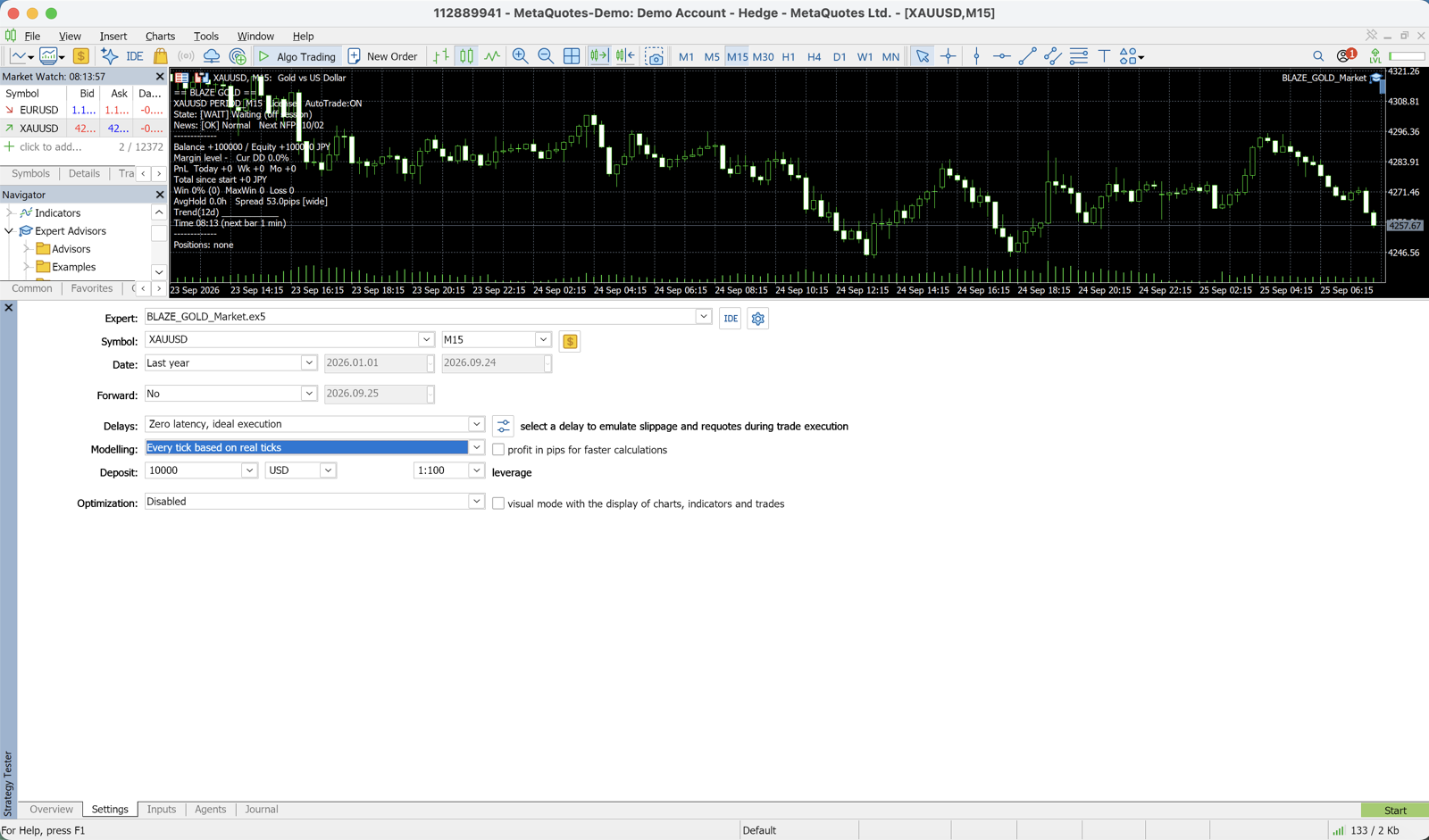
- Expert: Select the EA you want to test
- Symbol: GOLD, EURUSD, etc.
- Timeframe: M15, H1, etc.
- Period: At least 5 years; 10 years is preferred
- Model: "Every tick" is recommended (highest precision)
- Deposit: The starting balance for the test
- Leverage: Match your live trading conditions
"Every Tick" vs. "Every Tick Based on Real Ticks" — What's the Difference?
MT5 offers several modeling modes:
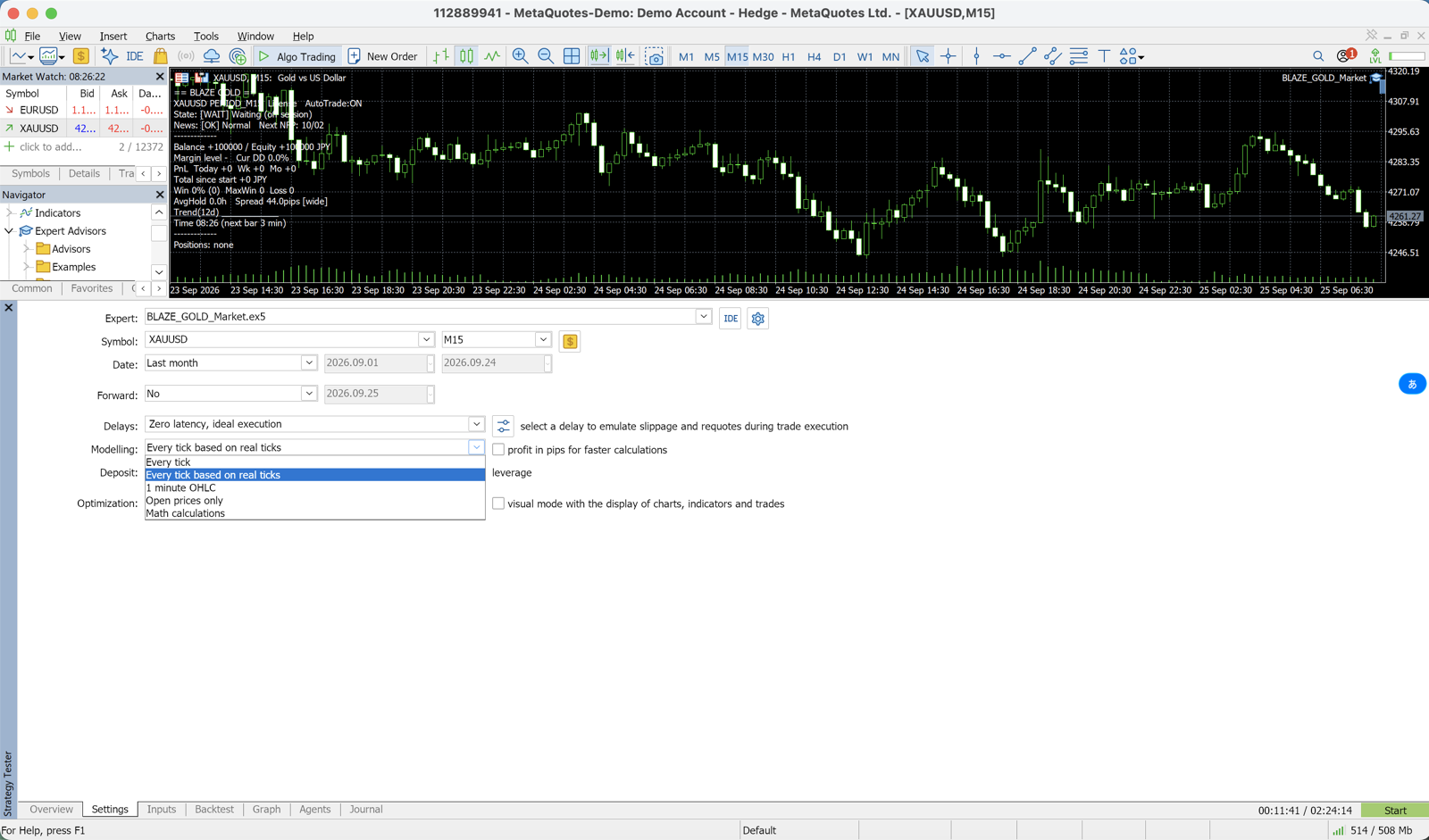
- Every tick based on real ticks: Highest accuracy, but takes the longest to run
- 1-minute OHLC: Fast, with moderate accuracy
- Open prices only: Very fast, but low accuracy — unsuitable for scalping strategies
The shorter your EA's trade duration, the higher the modeling precision you need. A result that looks good on "Open prices only" can deteriorate dramatically when re-run at full tick precision.
Historical Data Quality
The quality of MT5's built-in historical data varies by broker and server. Before running a backtest, verify:
- Modeling quality: 90% or above is desirable
- Data gaps: Older data tends to have more missing bars
- Spread: Use a value close to the real average spread for your broker
Selecting "variable spread" in the backtest means you only test against normal-market spreads — the wider spreads seen during major news releases are not reflected. Since those widenings eat into live profits, another valid approach is to run with a fixed spread set to a realistic worst-case value.
Reading Backtest Results
Here are the key metrics shown after a backtest and what to look for.
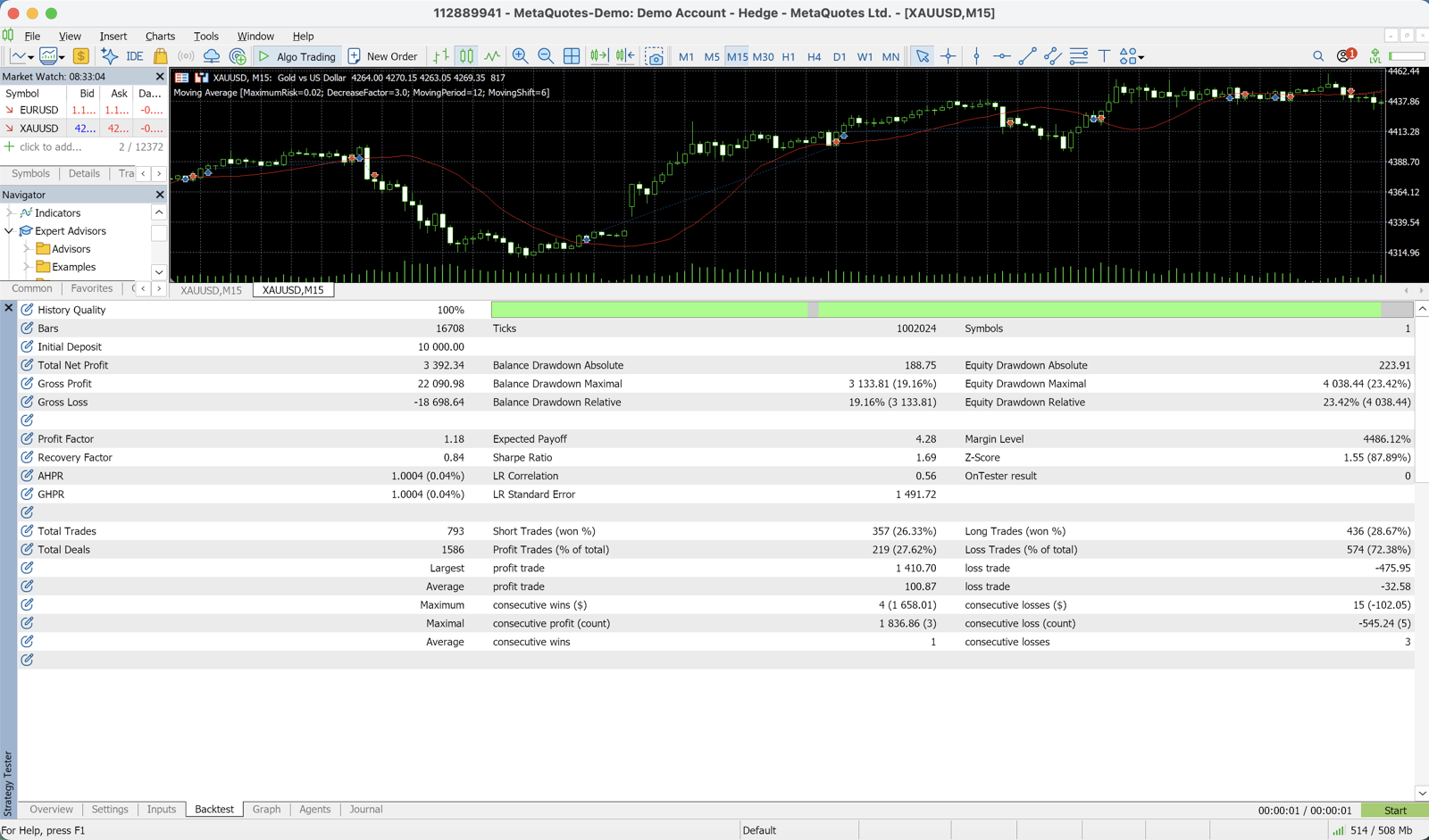
Profit Factor (PF)
Total profit divided by total loss. A healthy, realistic range is roughly 1.2 to 1.5. Any EA showing a PF above 3.0 should almost certainly be suspected of curve-fitting.
Maximum Drawdown
The largest peak-to-trough decline in account equity over the test period. Whether you can personally tolerate this figure determines whether the EA is viable for you. Assume that live drawdown will be 1.5 to 2 times worse than the backtest figure.
Number of Trades
A few dozen trades carries no statistical weight. Aim for at least 200 trades, ideally 500 or more to draw meaningful conclusions.
Recovery Factor
Net profit divided by maximum drawdown. A value of 3 or higher suggests the return is proportionate to the risk taken.
Avoiding Curve-Fitting
An EA that has been over-optimized to fit past data will not work in future markets. The basic defenses are:
1. Out-of-Sample (OOS) Validation
Split your data: for example, optimize on 2015–2022 and test on 2023–2025. If the out-of-sample period delivers comparable results, the risk of over-optimization is much lower.
2. Check Parameter Sensitivity
If shifting the optimal parameter by ±10–20% causes a dramatic collapse in results, that is a warning sign. Look for parameters that sit in a flat plateau — a region where small changes still produce stable outcomes.
3. Test Across Multiple Symbols and Timeframes
An EA that only works on one specific symbol and timeframe may simply be over-fitted to those conditions.
Backtesting the EAs on This Site
The backtest results for this site's free EA DONCHIAN ENGINE (USDJPY H1) are as follows:
- Test period: 2017–2026 (9.4 years, Dukascopy real ticks)
- Profit Factor: 1.50
- Win rate: 34.5%
- Maximum drawdown: 10.8%
- Trades: 631
The win rate is on the low side, but as a trend-follower that cuts losses short and lets profits run, it achieved PF 1.50 over 9.4 years and 631 trades. The latest figures are published on the EA page and in the Rankings.
The Importance of Forward Testing
Once a backtest shows solid results, run a 3 to 6 month forward test on a demo account or micro account. Testing against real-time fills, real slippage, and actual news-event behavior lets you catch bugs and unexpected behavior before committing live capital.
Free EA Download
DONCHIAN ENGINE is distributed free of charge. You can check the backtest figures above on its EA page.
See the free EA DONCHIAN ENGINE
Recommended Brokers
To run backtests and forward tests in the same environment, this site recommends verified brokers.
Related
📧 Free 8-email course + subscriber-only pack of 13 MT5 indicators
Right after you sign up, you get a download link for a subscriber-only pack of our 13 MT5 indicators: compiled files (.ex5), source code and a setup guide. Then 8 emails on algo-trading essentials, reading backtests correctly and choosing a broker (one a day for the first 5 days, then 7, 14 and 30 days after signing up). You also get notified before each price rise of the versions sold on the MQL5 Market (launch pricing that steps up as copies sell). Our EAs are free on this site with a live account at a partner broker.
* Privacy strictly protected. You can unsubscribe at any time.
Have a question about EAs or FX?
You can post it on the Nattzy trading forum (free sign-up). Questions beyond this article are welcome too — EA settings, choosing a broker and more.
Ask on Nattzy ↗