
Genetic algorithm optimisation in MT5 EAs
Contents
A Practical Introduction to Genetic Algorithm Optimization in MT5 EAs
When tuning EA parameters, MT5's Strategy Tester offers two optimization modes: exhaustive search (testing every possible parameter combination) and genetic algorithm (GA).
When the number of combinations is enormous, genetic algorithm is the standard approach for exploring the space in a realistic amount of time. This article explains the fundamentals of genetic algorithm optimization and the key practical points to keep in mind.
Key takeaways
- If there are more than tens of thousands of combinations, search with a genetic algorithm (GA) instead of exhaustive search
- Choose recovery factor or Sharpe ratio as the evaluation metric, and exclude solutions with few trades
- Decide on the values to adopt not from the single top-scoring result, but by checking the clustering of the top 10–20 results, parameter sensitivity and a split-period test
The Optimization Workflow (Overview)
| Step | What to do | Details |
|---|---|---|
| 1 | Limit the parameters to optimize to a few at the core of the logic | Narrow Down What Gets Optimized |
| 2 | Look at the number of combinations and decide between exhaustive search and GA | When to Use Each Method |
| 3 | In the tester, set "Fast genetic algorithm" and the evaluation metric | Configuring the Strategy Tester |
| 4 | Run the optimization and check convergence in the "Optimization Results" tab | Running the Optimization |
| 5 | Remove overfit solutions with a split-period test, a comparison of top solutions and a sensitivity check | Avoiding Overfitting |
| 6 | If it takes too long, shorten it with parallel agents or the cloud | Leveraging Parallel Optimization |
What Is a Genetic Algorithm?
A genetic algorithm (GA) is an optimization technique modeled on biological evolution. The process works roughly as follows:
- Generate multiple sets of random parameters ("individuals")
- Run a backtest for each individual and score it using an evaluation metric (PF, recovery factor, etc.)
- Select the top-scoring individuals as "parents" and produce a next generation through crossover and mutation
- Repeat this cycle — with each generation, the parameters converge toward higher-scoring values
Where exhaustive search sweeps through every combination, GA narrows its search to promising regions, cutting computation time by orders of magnitude.
When to Use Each Method
| Exhaustive search | Genetic algorithm (GA) | |
|---|---|---|
| How it searches | Sweeps through every combination | Narrows the search to promising regions |
| Suitable scale | Few parameters, fewer than a few thousand combinations | Many parameters, tens of thousands of combinations or more |
| Computation time | Grows in proportion to the number of combinations | Shorter by orders of magnitude |
For example, three parameters each stepped across 10 values yields 1,000 combinations — exhaustive search is perfectly fine. But five parameters each stepped across 20 values produces 3.2 million combinations, at which point genetic algorithm becomes necessary.
Configuring the Strategy Tester
To enable optimization, set the following in the Strategy Tester panel:
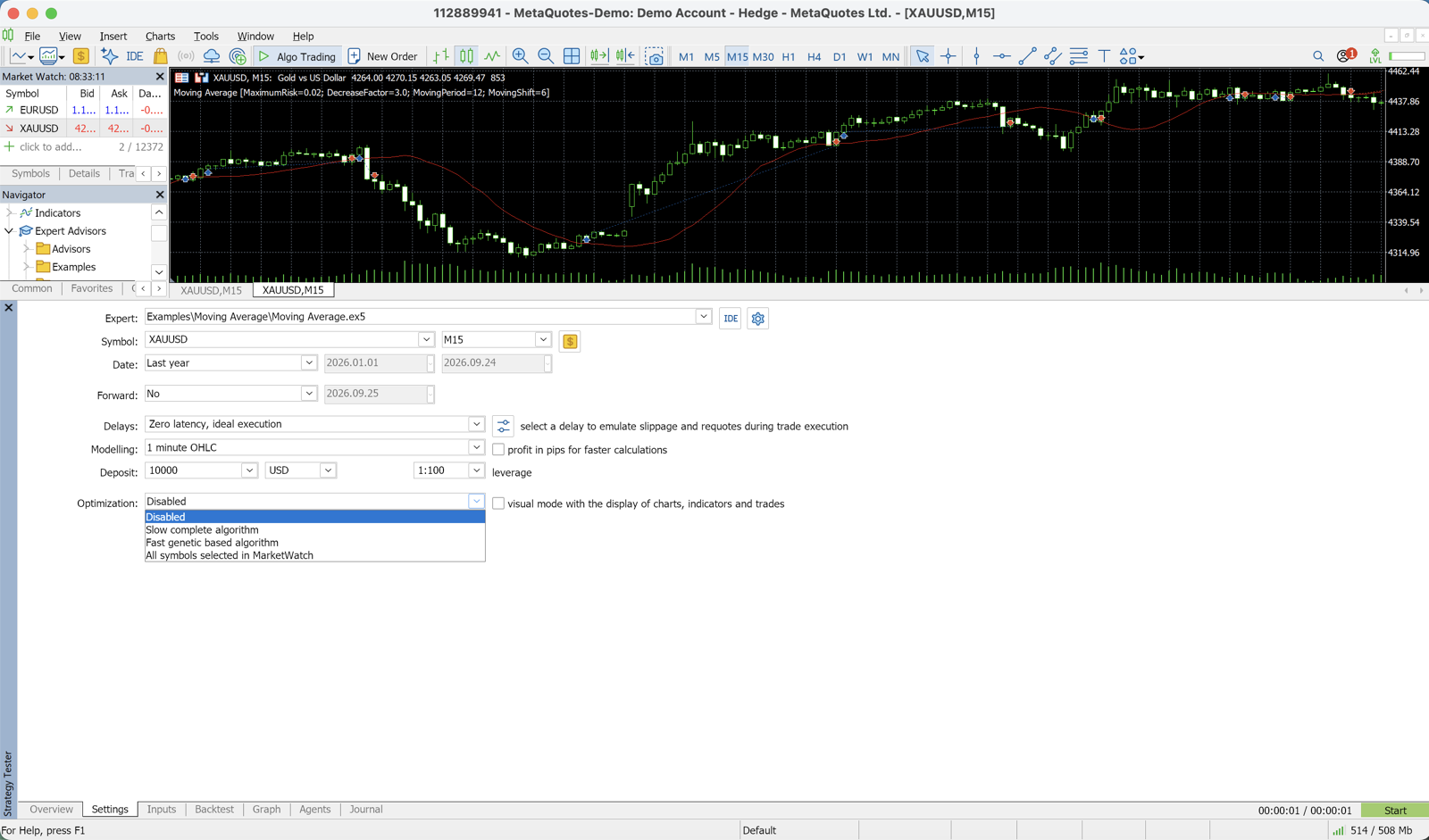
- Optimization: Select "Fast genetic algorithm"
- Result: Choose an evaluation metric such as "Maximum balance," "Custom max," or "Maximum recovery factor"
- Inputs tab: Check the parameters you want to optimize and set the start value, end value, and step size
Choosing Your Evaluation Metric
What you define as "good" determines the outcome. Here are the most common metrics and their characteristics:
| Metric | What it measures | Characteristics |
|---|---|---|
| Maximum balance (profit) | Maximizes profit alone | Ignores risk, making overfitting easy to stumble into |
| Recovery factor | Net profit ÷ maximum drawdown | Balances return and risk |
| Sharpe ratio | Accounts for the stability of returns over time | Emphasizes stability |
| Custom max | Freely defined inside the EA code (e.g., PF × trade count) | Can be designed to fit your goal |
Using recovery factor or Sharpe ratio is the most practical approach for finding useful parameters while avoiding overfitting.
Running the Optimization
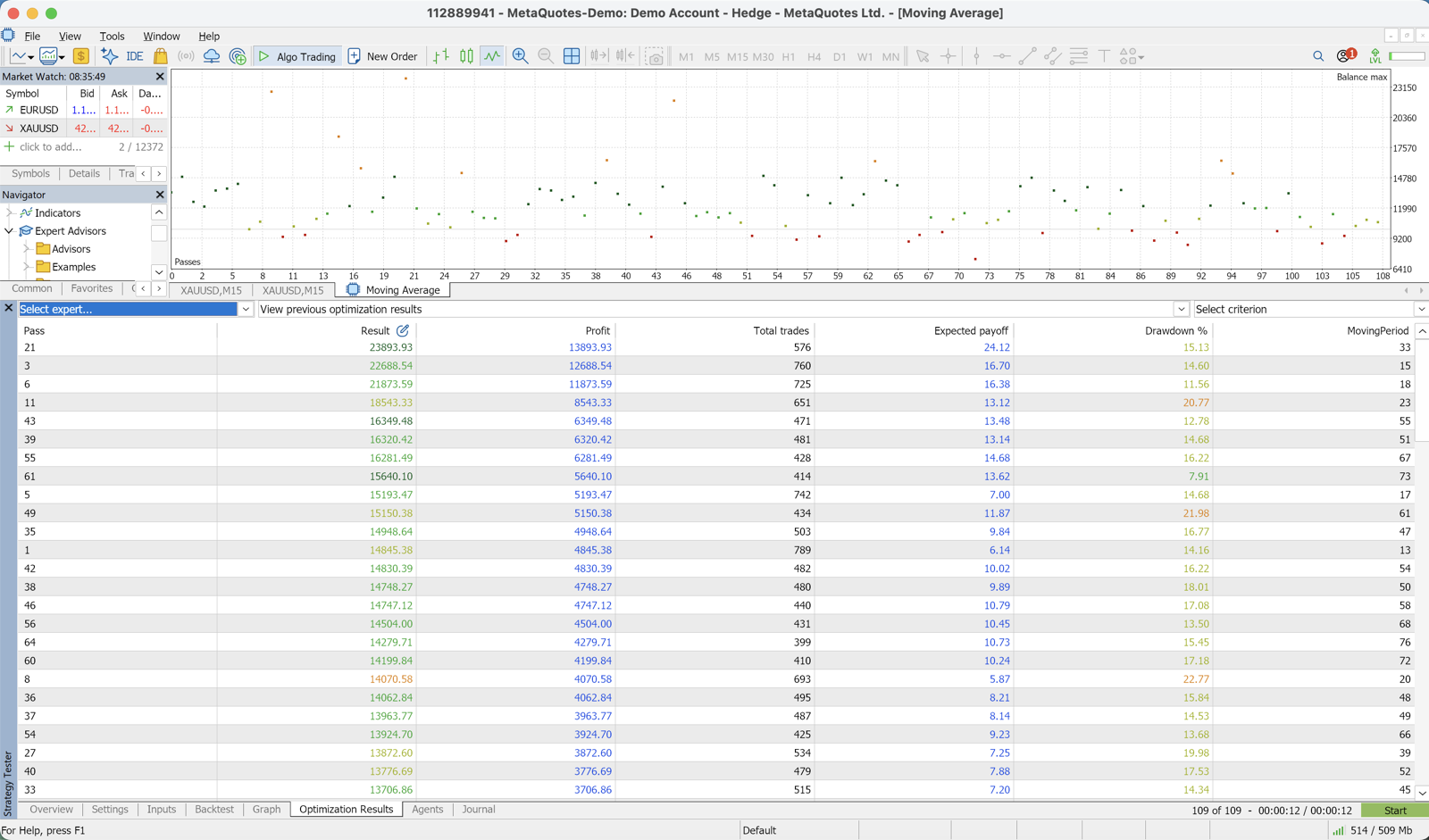
Once optimization starts, the "Optimization Results" tab fills with high-scoring parameter sets, generation by generation.
MT5's genetic algorithm automatically runs through hundreds of generations, converging toward top solutions.
Common Pitfalls
| Symptom | Likely cause |
|---|---|
| Converges too quickly | The parameter search range may be too narrow |
| Never converges | The evaluation metric may be inappropriate, or there may be too much noise |
| Converges to an obviously strange value | Results with very few trades have not been filtered out |
You can eliminate low-sample noise solutions by baking a filter into your evaluation function — for example, "exclude any result with fewer than 50 trades."
Avoiding Overfitting
The more you optimize, the closer you get to parameters that look perfect on historical data but fail in live markets. Here are four practical rules to prevent that.
| Rule | What to check |
|---|---|
| 1. Split your data period | Whether results hold up on the later out-of-sample period |
| 2. Compare the top 10–20 results | Whether the top solutions cluster in a similar region |
| 3. Check parameter sensitivity | Whether results stay intact when parameters are shifted ±10–20% |
| 4. Keep some parameters fixed | Whether you keep fixed values that are natural for the logic |
1. Split Your Data Period
With ten years of historical data, optimize on the first seven years and use the remaining three years as an out-of-sample test. If results deteriorate on the latter period, the strategy has overfit to the earlier one.
2. Compare the Top 10–20 Results
Picking only the single top-scoring result is risky.
Check whether the top solutions cluster in a similar region. If they do, adopt a parameter set near the center of that cluster.
3. Check Parameter Sensitivity
Take your candidate parameters and shift them ±10–20%, then verify that performance does not collapse. If it does, that solution is overfit to a narrow "spike" in the optimization landscape.
4. Keep Some Parameters Fixed
Always retain at least a few parameters that are not optimized — values that are naturally justified by the strategy logic. This reduces the risk of overfitting.
For example, you might optimize the EMA periods while keeping the ATR multiplier fixed.
Leveraging Parallel Optimization
MT5 supports parallel optimization across multiple CPU cores. Increasing the number of agents under "Tester" → "Settings" reduces computation time.
You can also use the MQL5 Cloud Network to run large-scale optimizations on remote agents worldwide, though this incurs costs. The efficient approach is to first narrow down the parameter range locally, then offload the fine-grained sweep to the cloud if needed.
Narrow Down What Gets Optimized
The basic rule is to limit optimization to a small number of parameters at the core of the logic, such as the entry lookback period and the stop-loss distance.
Fixing all other parameters at naturally justified values makes it easier to guard against overfitting.
A backtest's PF can be pushed up almost indefinitely by optimizing more, but the probability of the EA failing in future markets rises along with it. Choosing modest numbers and running them consistently is the practical answer for live trading.
Free EA Download
This site's free EA DONCHIAN ENGINE (USDJPY H1) has a backtest over 9.4 years of USDJPY H1 data (2017-2026, Dukascopy real ticks) with PF 1.50, a 34.5% win rate, max DD of 10.8%, and 631 trades.
See the free EA DONCHIAN ENGINE
Recommended Brokers
We recommend brokers with high execution quality so that backtest and optimization results translate reliably into live trading performance.
Related
📧 Free 8-email course + subscriber-only pack of 13 MT5 indicators
Right after you sign up, you get a download link for a subscriber-only pack of our 13 MT5 indicators: compiled files (.ex5), source code and a setup guide. Then 8 emails on algo-trading essentials, reading backtests correctly and choosing a broker (one a day for the first 5 days, then 7, 14 and 30 days after signing up). You also get notified before each price rise of the versions sold on the MQL5 Market (launch pricing that steps up as copies sell). Our EAs are free on this site with a live account at a partner broker.
* Privacy strictly protected. You can unsubscribe at any time.
Have a question about EAs or FX?
You can post it on the Nattzy trading forum (free sign-up). Questions beyond this article are welcome too — EA settings, choosing a broker and more.
Ask on Nattzy ↗