
GOLD TRIPWIRE EA
A breakout EA for XAUUSD only. It places buy stop / sell stop orders at swing highs and lows (fractals) confirmed on H1, and skips unfavourable conditions with ATR (volatility) and slope filters. After a fill, a staged trailing stop locks in profit. At most one position per side, no averaging, no martingale. It runs on any XAUUSD chart timeframe (it reads H1 internally).
Pair
XAUUSD
Timeframe
H1
Recommended Broker
Exness
Live BT Period
6.8 yrs
🛡 10th EA in the defensive lineup — gold breakouts only
It never averages down or uses martingale, and holds at most one position per side. Before every order it checks volume, stop/freeze levels, margin and market hours, and skips orders that fail. A built-in performance breaker stops real trading and switches to virtual trades when the recent profit factor drops below a threshold, then returns to real trading once it recovers.
🥇 GOLD BREAKOUT EA
GOLD TRIPWIRE EA
XAUUSD only · stop-order breakouts at swing highs/lows
Profitable in every year of a 6.8-year MT5 backtest (2020.01-2026.10 / Exness)
Cumulative
+760%
6.8 yrs · Ultra
PF
2.72
Relative equity DD
12.7%
Trades
616
Win rate 58.6%
⚡ Minimum deposit: from 100k JPY (Standard or Micro account, either is fine)
You can operate from 100k JPY. If you want to run it more safely with a smaller amount, we recommend a Micro (cent) account (the real exposure of a 0.01 lot becomes about 1/100, making the same 100k JPY far lower-risk).
Verification Status
How far verification has progressed, from backtest to forward testing
- BacktestDone
- Period
- M15 (2020.01.01 - 2026.10.14)
- History quality
- 11% real ticks — real-tick coverage is low for this period, so fill prices are reproduced less accurately
- Trades
- 616
- PF
- 2.72
- Max DD (relative, equity)
- 12.72% (equity DD at the largest loss in money terms: 7.08%)
- Recommended minimum capital
- $1,000+ recommended
- OOSCaution
- Data source
- MT5 official ticks
- Years verified
- 6.8
- ForwardNot started
Forward testing has not started for this EA. Judge it by the backtest / OOS figures above only.
See all forward tests → - LiveNot started
How the strategy works (entry, stop, target)
XAUUSD only. It places buy stop / sell stop orders at swing highs and lows (fractals) confirmed on H1 and joins only when price breaks through. After a fill, a staged trailing stop locks in profit early (average hold about 21 minutes).
REAL MT5 BACKTEST
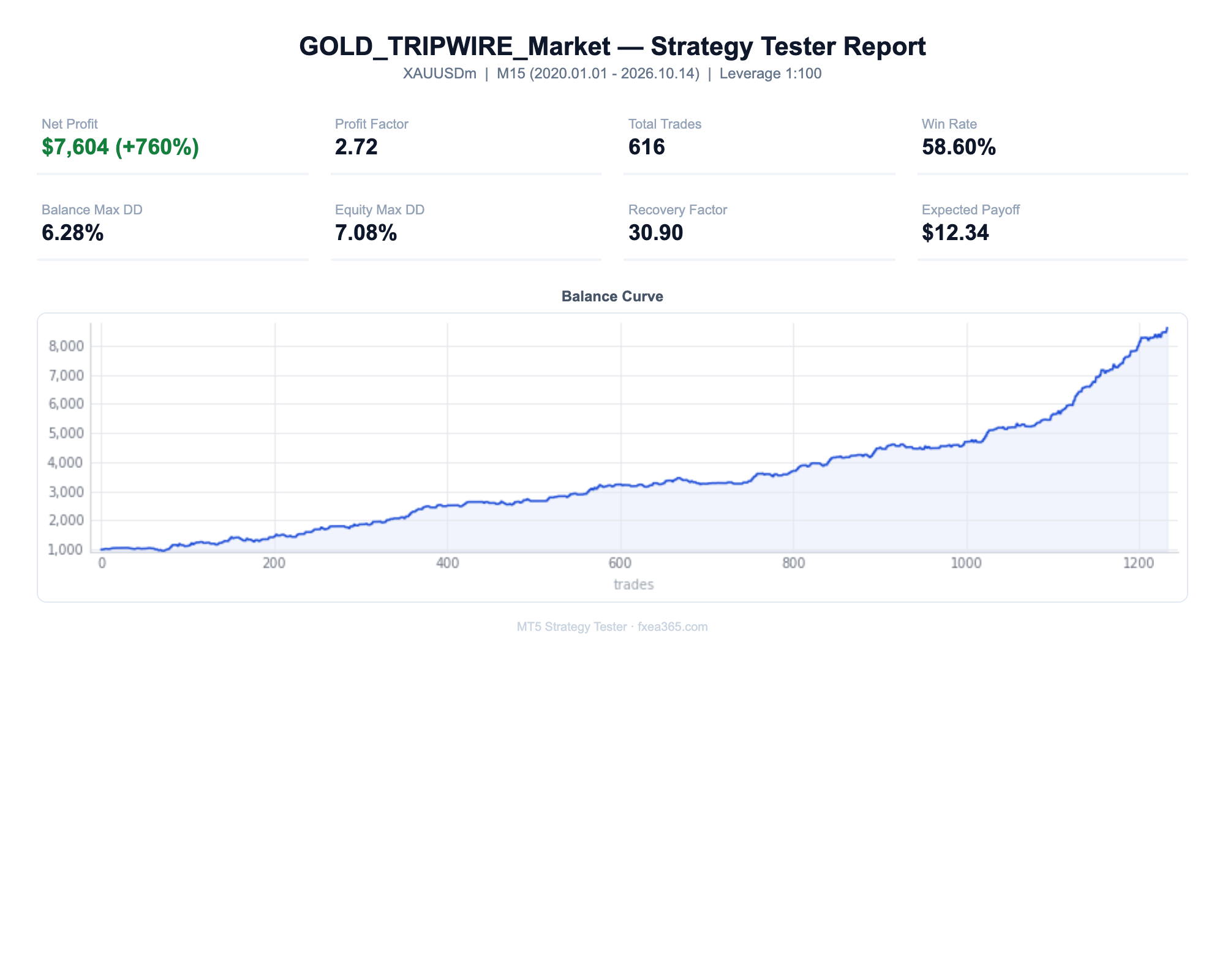
📈 MT5 backtest results (XAUUSD / Exness / $1,000 deposit / Ultra default)
| Metric | Measured (Ultra default) | Assessment |
|---|---|---|
| Verification Period | 2020.01 – 2026.10 (6.8yr) | Profitable every year |
| Net Profit / Cumulative | +$7,604 (+760%) | $1,000 → $8,604 |
| Profit Factor | 2.72 | Clears the flagship standard (PF≥1.5) |
| Max equity DD / relative equity DD | 7.08% / 12.72% | Low |
| Trades / Win Rate | 616trades / 58.6% | Short holds (21 min on average) |
| Recovery factor | 30.90 | Good |
| History quality | 11% | Low (11% real ticks) — read the figures with a discount |
RESULTS BY RUN MODE
Results by run mode (same period, $1,000 deposit)
| Mode | Lot multiplier | Net profit | PF | Max equity DD |
|---|---|---|---|---|
| Defensive | ×0.5 | +$770.07 | 2.67 | $24.62 (1.96%) |
| Standard (0.02 lot) | ×1 | +$1,526.37 | 2.70 | $49.20 (3.28%) |
| Aggressive | ×2 | +$3,038.84 | 2.72 | $98.39 (4.95%) |
| Ultra (shipped default) | ×5 | +$7,603.64 | 2.72 | $246.07 (7.08%) |
Every mode takes the same 616 trades; only the lot differs. The return % in the run-mode table below is also based on a $1,000 deposit (not the $10,000 stated in the shared note).
📈MT5 Strategy Tester Report — GOLD TRIPWIRE EA
📋 About this report
- Official report generated by the MT5 Strategy Tester (real-tick data)
- Multi-year real price data with the every-tick (real ticks) model
- Balance curve (blue) / Equity curve (green) shows floating losses too
- Past results do not guarantee future profits
⚠️ Risk Warning
- The return depend on the 2020-2026 gold market. Future replication is not guaranteed
- It reproduces the logic of another vendor's EA and was tuned on the same broker's (Exness) data. There is no out-of-sample test on another period or broker
- The published backtest has 11% history quality (real ticks). Spreads and fills are reproduced roughly, so live results can be worse
- Ultra (the shipped default) trades 5× the Standard lot. Max equity DD was 7.08% and relative equity DD 12.72%. If that worries you, switch to Defensive or Standard
- Short-term stop-order breakouts change a lot on accounts with wide spreads or slow fills. While the performance breaker has switched to virtual trades, the EA does not trade on the real account
Run Mode
MeasuredThe "RunMode" setting switches how aggressively the EA trades. On EAs whose chart panel has run-mode buttons, you can also switch with one click (applies from the next new entry). Only the lot (risk) changes — entry/exit logic, symbol and timeframe stay the same.
This EA ships set to Ultra, the highest-risk mode. If you want lower risk, switch to Standard or Defensive before you start.
Defensive
×0.5Half the Standard lot. For capital preservation or first-time automated trading.
Standard (recommended)
×1.0The reference risk level. Start here.
Aggressive
×2.0Twice the Standard lot. Drawdowns deepen and the risk of ruin rises. Use only money you can afford to lose.
Ultra
The maximum risk level set for each EA. Produces the deepest drawdowns. Only for traders who fully accept the risk.
Measured backtest: XAUUSD H1, 2020-01 – 2026-10, 616 trades, $10,000 start, MT5 Strategy Tester. Returns are totals for the whole period, not annual. Every mode trades the same signals; only the lot differs.
Past performance does not guarantee future results. With compounding on, lots adjust automatically to the balance.
All Parameters
All 50 inputs shown in MT5 (EA core + shared modules). Strategy-core values are pre-optimized — keep them at defaults; tune only the operational ones as needed.
| Parameter | Default | Description |
|---|---|---|
| General | ||
VersionCheck_Enable | true | Enable automatic update notifications. |
RunMode | MODE_ULTRA | Run mode (Defensive x0.5 / Standard x1.0 / Aggressive x2.0). Switches the lot multiplier. |
| Economic Event Filter | ||
EconFilter_Enable | true | Avoid trading around high-impact economic events. |
EconFilter_AvoidNFP | true | Avoid NFP (1st Friday each month). |
EconFilter_AvoidFOMC | true | Avoid FOMC (US Federal Open Market Committee). |
EconFilter_AvoidCPI | true | Avoid CPI (US consumer price index). |
EconFilter_AvoidWeekend | true | Avoid weekend risk (late Fri / early Mon). |
EconFilter_AvoidHoursBefore | 2 | Avoid N hours before the release. |
EconFilter_AvoidHoursAfter | 1 | Avoid N hours after the release. |
EconFilter_ServerGMTOffset | 3 | Server-time GMT offset (summer=3 / winter=2). |
EconFilter_Verbose | false | Verbose filter logging. |
EconFilter_UseCalendar | true | Auto-fetch from MT5 economic calendar (falls back to NFP/CPI rules where unavailable). |
EconFilter_MinImportance | 2 | Min calendar importance (1=low+ / 2=medium+ / 3=high only). |
EconFilter_Currencies | USD | Calendar target currencies (CSV, e.g. USD,EUR,JPY). |
EconFilter_StopImportance | 3 | Fully stop new entries at this importance or above. |
EconFilter_StopBeforeMin | 120 | Stop: N minutes before release. |
EconFilter_StopAfterMin | 60 | Stop: N minutes after release. |
EconFilter_ReduceLotFactor | 0.5 | Lot factor on medium impact (reduce instead of stop). |
EconFilter_ReduceBeforeMin | 30 | Reduce lot: N minutes before. |
EconFilter_ReduceAfterMin | 15 | Reduce lot: N minutes after. |
| Safety Guard | ||
Guard_Enable | true | Enable the safety guard (forward only). |
Guard_EmergencyMargin | 120.0 | Close all if margin level falls below this % (0=off). |
Guard_DailyLossPct | 8.0 | Stop new entries for the day at this daily loss % (0=off). |
Guard_DailyLossClose | false | Also close open positions when the daily loss is hit. |
Guard_MaxConsecLoss | 0 | Stop new entries for the day after N consecutive losses (0=off). |
Guard_FridayClose | false | Close everything late Friday. |
Guard_FridayCloseHour | 20 | Friday close-all hour (server time). |
| News Protect | ||
Guard_NewsProtectMode | 0 | 0=off / 1=SL to break-even / 2=half close / 3=close all. |
Guard_NewsProtectMin | 15 | Run protection N minutes before high-impact events. |
| Dashboard / Notify | ||
Notify_Push | true | MT5 mobile push notifications (requires MetaQuotes ID). |
Notify_Email | false | Email notifications (requires MT5 email setup). |
Notify_WebhookURL | — | Generic webhook URL (Discord/Slack, etc.; empty=off). |
Notify_MarginAlert | 150.0 | Alert when margin level falls below this %. |
Notify_DailySummary | true | Send a daily summary at a set time. |
Notify_SummaryHour | 6 | Daily summary send hour (server time, 0-23). |
Dash_TradeCSV | true | Record all fills to CSV (MQL5/Files). |
Dash_PauseButton | true | Show a pause button on the chart. |
Dash_ShowPanel | true | Show the status panel on the chart (false = plain text) |
Dash_Language | FXLANG_AUTO | Panel language (Auto = terminal language) |
Notify_NewsPrewarnMin | 60 | Pre-warn N minutes before entries are halted (0=off). |
EA_Slug | gold-tripwire | FXEA365 site EA identifier (do not change). |
| Position size | ||
InpLot | 0.02 | Base lot (Standard mode; scaled by Run mode) |
InpRiskPct | 0 | Risk % of balance per trade (0 = use base lot) |
| General | ||
InpMagic | 20261020 | Magic number |
DetailedLog | true | Logs wait/skip reasons, entries and exits to the Journal (forward only). |
LogVerbose | false | Verbose tier: log pivots and filter detail |
| Performance breaker | ||
InpBrkN | 30 | Trades evaluated by the breaker (0 = off) |
InpBrkOff | 0.3 | Pause real trading when profit factor falls below |
InpWarmMul | 0.3 | Lot multiplier until the breaker has enough trades |
InpBrkOn | 1.0 | Resume real trading when profit factor reaches |
Defaults and descriptions follow the EA source. Lot inputs show the effective value after the run-mode multiplier (Defensive x0.5 / Standard x1.0 / Aggressive x2.0). See the bundled MANUAL.html for details.
Always-on chart panel
Once the EA is on the chart, a panel shows its status at a glance.
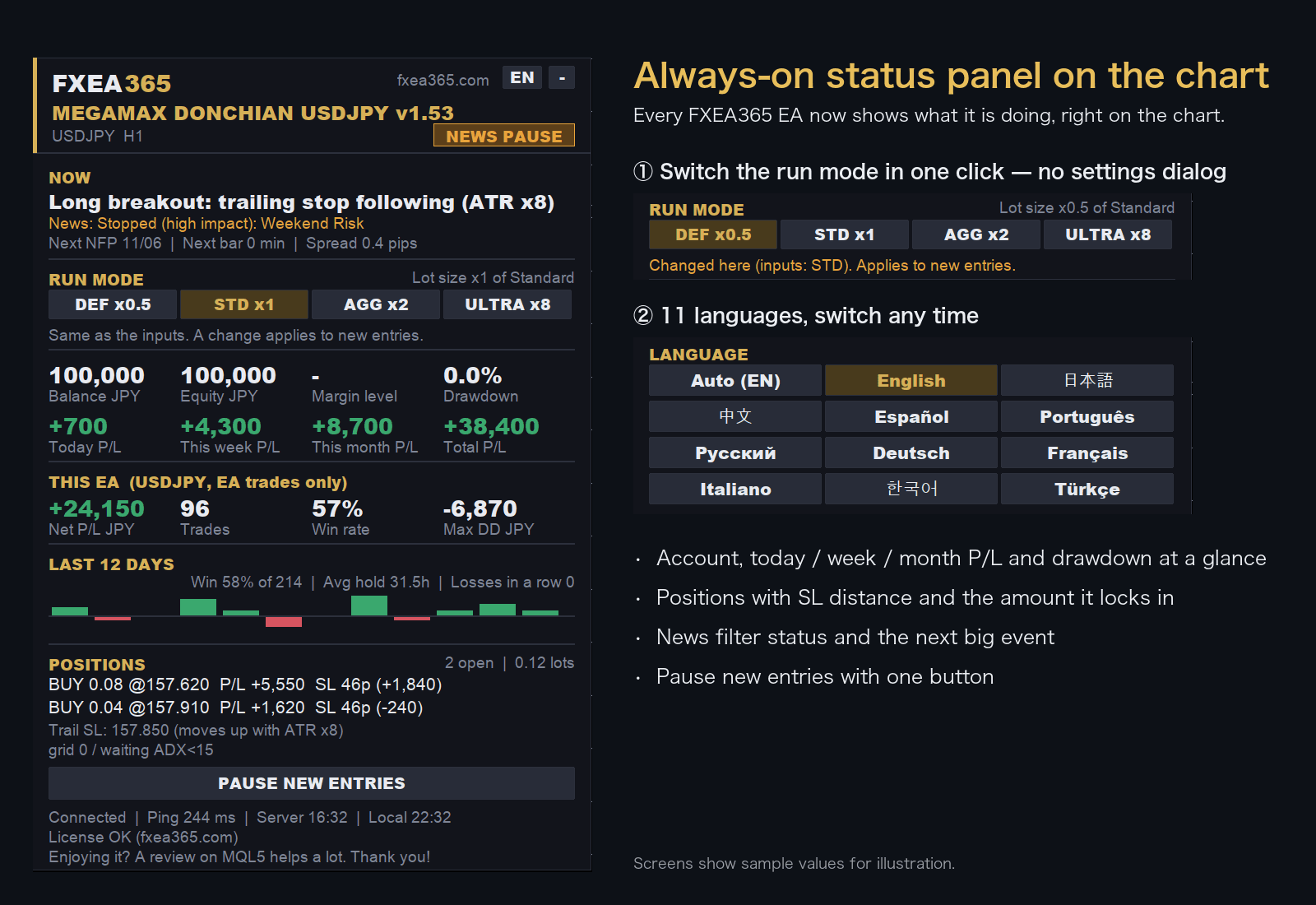
- Switch the run mode with a button on the chart (no need to reopen the settings)
- Choose the display language from 11 languages
- Live P/L, maximum drawdown and EA net profit
- Open positions with distance to SL
Screens show sample values for illustration.
EA Setup Guide
- Copy to the MQL5/Experts folderCopy the .ex5 file to the MQL5/Experts folder inside the MT5 data folder (File > Open Data Folder)
- Allow fxea365.com in MT5 WebRequest settingsIn MT5 open Tools → Options → Expert Advisors, tick "Allow WebRequest for listed URL", add https://fxea365.com and press OK. The EA checks your account licence there on start-up; without this it stops with "code=4014"
- Attach the EA to a chartOpen the chart for the target currency pair, drag the EA from the Navigator panel onto the chart, check "Allow Algo Trading," and click OK
- Turn on the Algo Trading buttonTurn on the "Algo Trading" button (green) in the MT5 toolbar. A smiley face (😊) in the top right of the chart means it is running
How to Set Up an EA in MT5 | From Installation to Operation →
Free download (register your account number)
STEP 1 Prepare your account
Using the EA requires an MT5 account opened through our referral link. If you already have an account, please create an additional account.
No account yet — open a new account via the links below
Adding an account — create an additional account in your member pageSee how →
Buy the paid version (MQL5 Market, no account registration)
Buy GOLD TRIPWIRE EA
This EA is coming soon on the MQL5 Market. For now you can download it free with a broker account to try it.
Frequently asked questions
- What is the difference between the free and paid versions?
- The free version works once you register the number of an Exness, XMTrading or HFM trading account opened through our referral link. The paid version is a one-time purchase on MQL5 Market and needs no account registration. For some EAs the version or default settings differ between the two (see the version shown on each page).
- What happens if I change accounts?
- The free version runs only on the account number you registered. To use it on another account, register again with that account number.
- Can I backtest it?
- Yes. The MT5/MT4 Strategy Tester does not check the account, so you can test on any account type.
- Can I use it on a demo account?
- No. The free version runs only on the registered live trading account. Use the Strategy Tester to check how it behaves.
- What if the EA does not trade?
- See "Common problems and fixes" in the setup guide. How to Set Up an EA in MT5 | From Installation to Operation →