
The Complete Guide to EA Parameter Settings
Contents
- Types of Parameters and Their Importance
- Essential Parameter #1: RiskPercent (Risk Rate)
- Essential Parameter #2: Lots (Fixed Lot Size)
- Essential Parameter #3: MagicNumber
- Essential Parameter #4: MaxDailyLossPct / MaxDrawdownPct
- Time Filter Parameters
- Parameters You Should Never Change
- Step-by-Step Parameter Setup (Practical Guide)
- Common Mistakes to Avoid
- FAQ
- Related Pages
The Complete Guide to EA Parameter Settings — What Beginners Should Adjust First
After setting up an EA on MT5, one of the most common questions beginners ask is: "Which parameters should I change?" Change too many and your backtested results become invalid. Change too few and you may be running the EA with settings mismatched to your account. This article explains the key parameters beginners need to understand and how to configure them safely.
Types of Parameters and Their Importance
EA parameters fall into three broad categories:
| Type | Description | Should You Change? |
|---|---|---|
| Risk management | Lot size, risk percentage, stop loss | ✅ Must adjust |
| Filter settings | Trading hours, days of the week, news avoidance | ⚠️ Proceed with caution |
| Strategy core | EMA period, ATR multiplier, entry conditions | ❌ Do not change as a rule |
Essential Parameter #1: RiskPercent (Risk Rate)
Lot size = (Account balance × RiskPercent%) ÷ (SL width × pip value)
This is the single most important parameter. It determines what percentage of your account balance you are risking on each trade.
| RiskPercent | Risk Level | Recommended For |
|---|---|---|
| 0.5% | Very conservative | Demo trading or early live trading |
| 1.0% | Standard | Recommended default |
| 2.0% | Aggressive | After building a solid track record |
| 3.0%+ | High risk | Advanced traders only |
Example: With an account balance of $700 and RiskPercent = 1.0%, your maximum loss per trade is $7.
Start with 0.5–1.0% and only increase after at least three months of stable forward-test performance.
Essential Parameter #2: Lots (Fixed Lot Size)
For EAs that do not implement RiskPercent, you set a fixed lot size (Lots) directly.
| Account Balance | Recommended Lots (XAUUSD) |
|---|---|
| $700 | 0.01 (micro) |
| $3,500 | 0.01–0.02 |
| $7,000 | 0.02–0.05 |
XAUUSD (Gold) has large pip movements, so even 0.01 lots can produce noticeable swings in your P&L. Always start with the minimum lot size (0.01).
Essential Parameter #3: MagicNumber
MagicNumber = The unique ID number an EA uses to identify its own positions
If you run multiple EAs on the same account with the same MagicNumber, each EA may accidentally modify or close the other's positions.
| Scenario | MagicNumber Setting |
|---|---|
| Single EA only | Leave the default |
| Multiple EAs | Assign a unique number to each EA (e.g., 1001, 1002, 1003) |
You should also change the MagicNumber if you attach the same EA to the same currency pair multiple times with different timeframes.
Essential Parameter #4: MaxDailyLossPct / MaxDrawdownPct
These are the EA's automatic stop mechanisms.
MaxDailyLossPct = Stop the EA if daily losses exceed X% of account balance
MaxDrawdownPct  = Stop the EA if the account drops X% from its peak
| Parameter | Recommended Value | Meaning |
|---|---|---|
| MaxDailyLossPct | 3–5% | Stop if daily loss exceeds 5% |
| MaxDrawdownPct | 20–25% | Stop if account drops more than 25% from peak |
Setting these allows the EA to manage risk automatically, removing emotion from the equation.
Time Filter Parameters
StartHour / EndHour (Trading Hours)
Specifies the hours during which the EA is active.
StartHour = 0  → Active from midnight
EndHour   = 20 → Active until 8 PM (server time)
For XAUUSD, the European–New York session (typically high liquidity hours) is generally recommended. However, since the default settings are optimized through backtesting, do not change them without a clear reason.
NewsFilter (Economic Calendar Filter)
This is typically a true / false toggle.
true: Skip new entries around high-impact events (NFP, FOMC, etc.)false: Enter trades regardless of news events
For beginners, true is recommended. Note that some EAs require an API key when using an external economic calendar data source.
Parameters You Should Never Change
The following parameters are fundamental to the EA's strategy. Changing them without a clear reason invalidates the backtest results.
| Parameter | Why Not to Change It |
|---|---|
| EMA_Period | Core entry condition — changing it creates a different EA entirely |
| ATR_Multiplier | Determines SL/TP width — changes break the risk/reward ratio |
| RSI_Period | Core filter condition |
| MinATR / MaxATR | Volatility filter — misconfiguration can result in zero trades |
If you do need to change any of these, run a new backtest covering at least 5 years before using the modified EA in live trading.
Step-by-Step Parameter Setup (Practical Guide)
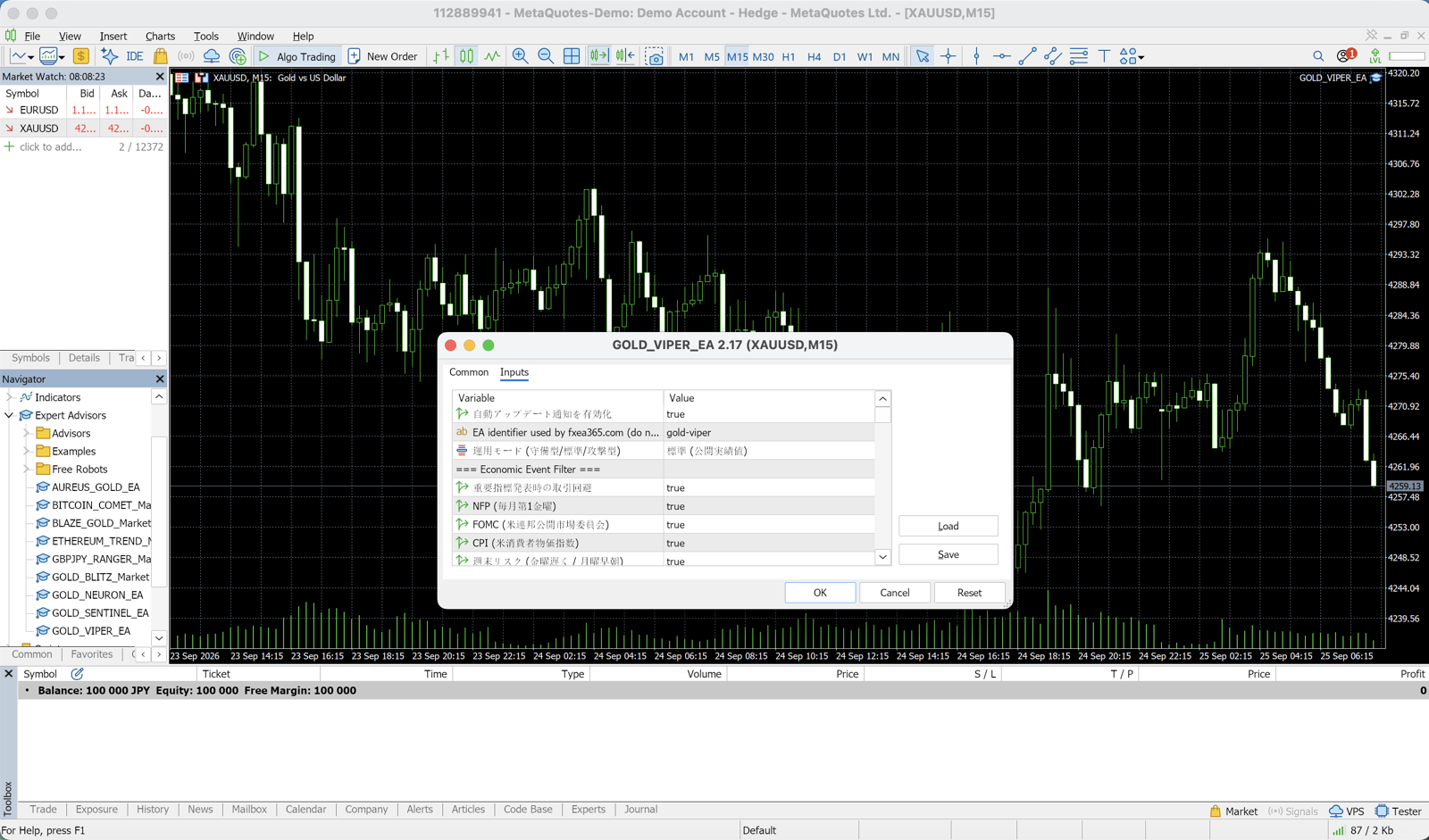
Step 1: Record the Default Settings
Before attaching an EA, note down all default parameters in a spreadsheet. This lets you revert if needed.
Step 2: Adjust Only RiskPercent
The first — and often only — change to make is RiskPercent (or Lots). Set it to 0.5–1.0%.
Step 3: Set MagicNumber
Only necessary if you are running multiple EAs simultaneously. Assign each a unique number.
Step 4: Configure MaxDailyLossPct and MaxDrawdownPct
Set up the automatic stop safety net.
Step 5: Leave Everything Else Alone
Do not touch any other parameters until you have at least three months of forward-test performance to evaluate.
Common Mistakes to Avoid
Mistake #1: Tweaking parameters and going live immediately
Any parameter change requires a new backtest to validate. Even a "small" change can dramatically alter the outcome.
Mistake #2: Changing parameters after a losing streak
Adjusting parameters mid-losing-streak makes it impossible to tell whether the drawdown is within the normal range shown in backtests. The losing streak is more likely caused by market conditions than by your parameters.
Mistake #3: Changing multiple parameters at once
When you change several settings simultaneously, you cannot determine which change actually affected the result. Make one change at a time.
FAQ
Q: Do I need to redo the backtest after changing parameters?
Yes. If you change any strategy or filter parameters, always run a new backtest. Changing only RiskPercent simply adjusts lot sizing and does not require a new backtest.
Q: What is the optimal RiskPercent?
It depends on your account balance, psychological tolerance, and the EA's maximum drawdown. For example, if an EA's backtest shows a maximum DD of 15%, set your RiskPercent so that the worst-case drawdown stays within 15% of your account. For beginners, 0.5–1.0% is a safe starting point.
Q: Can I set both Lots and RiskPercent at the same time?
It depends on the EA. When RiskPercent is implemented, the fixed Lots setting is usually ignored. Check the EA's documentation (README or manual) to confirm.
Related Pages
Related
📧 Free 8-email course + subscriber-only pack of 13 MT5 indicators
Right after you sign up, you get a download link for a subscriber-only pack of our 13 MT5 indicators: compiled files (.ex5), source code and a setup guide. Then 8 emails on algo-trading essentials, reading backtests correctly and choosing a broker (one a day for the first 5 days, then 7, 14 and 30 days after signing up). You also get notified before each price rise of the versions sold on the MQL5 Market (launch pricing that steps up as copies sell). Our EAs are free on this site with a live account at a partner broker.
* Privacy strictly protected. You can unsubscribe at any time.
Have a question about EAs or FX?
You can post it on the Nattzy trading forum (free sign-up). Questions beyond this article are welcome too — EA settings, choosing a broker and more.
Ask on Nattzy ↗