Home > EA > 7 features that protect your trading, built into FXEA365 EAs
Standard on every FXEA365 EA
Unlike ordinary EAs that 'just trade', FXEA365 EAs (except AIFW) ship with built-in features that protect and visualize your trading — at no extra cost.
FXEA365 EAs (except AIFW, which has its own design) ship — at no extra cost — with seven features that protect your capital and make your trading visible, separate from the entry logic itself. Most commercial EAs give you only the trading logic and leave safety and monitoring up to you. FXEA365 builds in the protections that actually matter in live trading from day one.
Auto-fetches NFP, FOMC, CPI and more from the MT5 economic calendar. New entries pause around releases, and lot size is auto-reduced for medium-impact events.
The EA pulls high-impact events (US NFP, FOMC, CPI, etc.) from the MT5 economic calendar and automatically halts new entries around the release window. For medium-impact events it shrinks lot size, while continuing to manage open positions — minimizing missed opportunities while avoiding event risk.
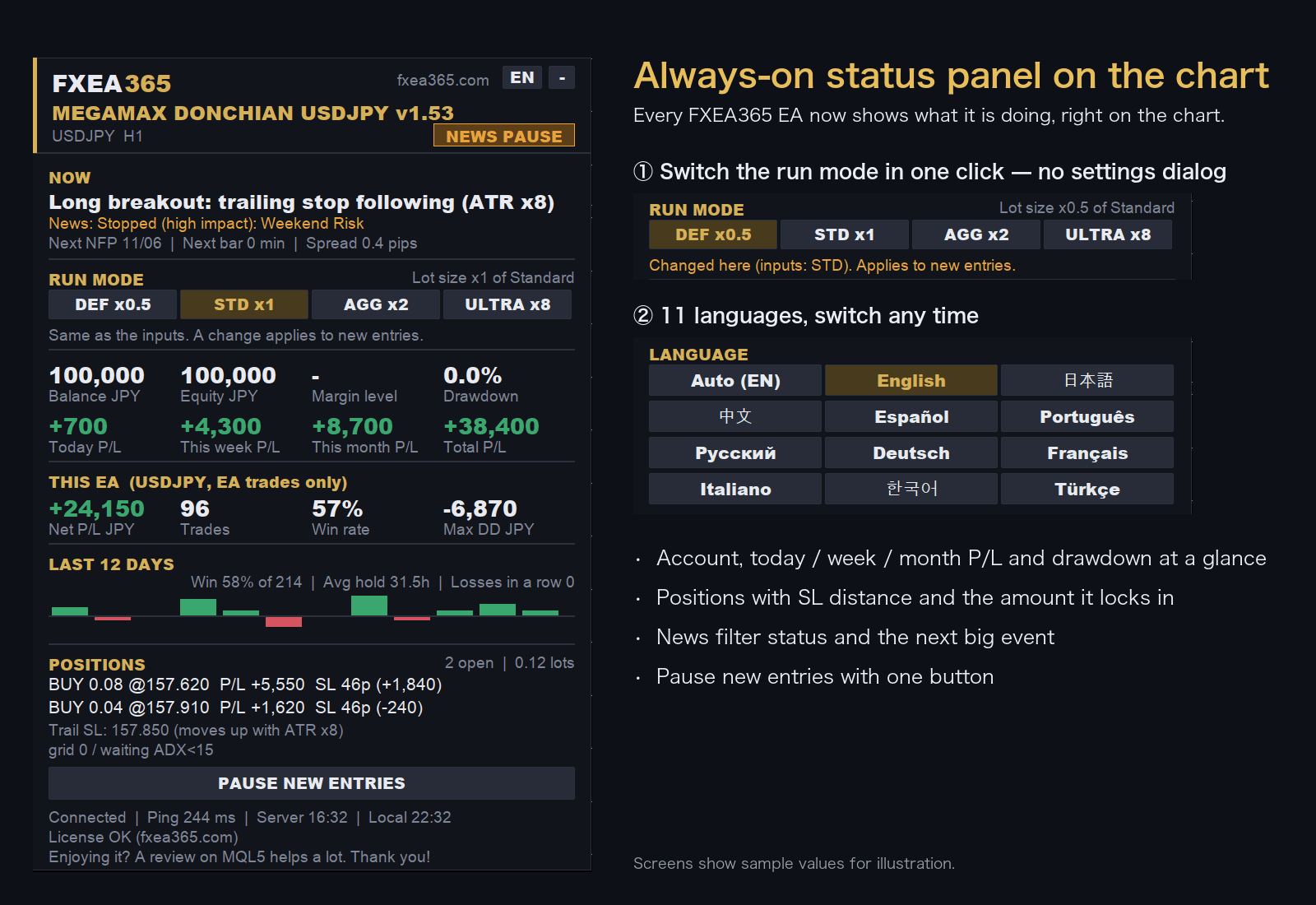
Balance, margin level, drawdown and today/week/month/total P/L — plus this EA's own P/L and max DD, open positions with distance to SL, and the time left in a news pause — shown at all times in a panel on the chart.
A panel on the chart always shows balance, equity, margin level, drawdown and today/week/month/total P/L. It also shows this EA's own net P/L, trades, win rate and max DD; a 12-day P/L chart with win rate, average holding time and losing streak; each open position's direction and distance/amount to SL and TP; the minutes left when trading is paused for news; and the next NFP, spread, connection, ping and server time. The panel can be collapsed.
Built-in emergency close on margin level, daily-loss stop, consecutive-loss stop, weekend close, and pre-news position protection — ready for sudden moves.
Emergency close-all on a dangerous margin level, daily-loss stop, losing-streak stop, weekend close and pre-news position protection are all built in. Multiple safety layers working together limit catastrophic account damage even in unexpected shocks.
Open/close, margin-level warnings, daily summary and pre-news alerts via MT5 push / email / webhook (Discord, etc.) — stay informed even when away.
Position opens, closes (with realized P&L), margin-level warnings, daily summaries and event previews are delivered via MT5 push / email / webhook (Discord, etc.), so you stay informed even when away. (LINE Notify is not supported as it ended in March 2025.)
Genuine license that runs only on registered accounts. Expiry and deactivation are auto-detected to prevent unauthorized copies.
Every EA uses genuine license authentication that runs only on your registered account. It re-validates periodically while running and automatically stops the EA safely on expiry or remote revocation, preventing unauthorized copying or redistribution.
Logs entries / skip reasons / exits and records every fill to CSV. Pause or resume new entries instantly with an on-chart button.
Reasons for entries/skips, trailing, grid add-ons and exits are logged line by line, and every fill is saved to CSV. A one-click on-chart button lets you instantly pause/resume new entries, so you stay in control during sudden market moves.
Change the run mode (DEF/STD/AGG/ULTRA) with the panel buttons; it applies from the next new entry. The panel language can be set to one of 11 languages. *Run-mode buttons appear only on EAs that support switching.
Press DEF (×0.5), STD (×1.0), AGG (×2.0) or ULTRA in the panel's run-mode row — no need to reopen the settings. The change applies from the next new entry; open positions stay as they are. ULTRA must be pressed a second time within 5 seconds to confirm, to prevent mistakes. The chosen mode and language are saved and kept after an MT5 restart (if you change RunMode in the settings, that takes priority). In the Strategy Tester the mode from the settings is used. Run-mode buttons appear on EAs that support switching (ATLAS, BITCOIN COMET, ETHEREUM EA, GOLD NEURON, GOLD VIPER, TRINITY); other EAs offer the language switch only.
All of these displays, notifications, filters and safety devices operate in forward (live) trading only and are automatically skipped during backtesting/optimization — so they have no effect whatsoever on the published backtest numbers.
Standard on every EA, at no extra cost
Download all 13 EAs free just by opening an account. The 12 EAs other than AIFW include these seven features out of the box.
View the EA list →* Privacy strictly protected. You can unsubscribe at any time.
