
المرتبة #1 على الموقعوسيط فوركس
Ex
Exness — دليل فتح الحساب ومراجعة
آخر تحديث: 20 مايو 2026
- ✓XAUUSD spread at industry-lowest levels
- ✓Instant withdrawals (24/7)
- ✓Zero-cut (no margin call)
- ✓Unlimited leverage (Pro accounts)
- ✓Full MT5 support, EA auto trading OK
- ✓Regulated by FCA, CySEC, and others
افتح حساباً مع Exness
سبريد منخفض، رافعة مالية غير محدودة، للمتداولين المتقدمين
⚠ For Existing Exness Account Holders (FXEA365 Referral Only)
※ This guide is only for users who opened their Exness account through FXEA365's referral link. If you haven't registered yet or signed up through a different channel, please open a new account using the button above (partner code: m6d0s2u1e2 is applied automatically). If you see a partner code field when creating an additional account, enter m6d0s2u1e2. Accounts that cannot be verified as affiliated will not be able to use our EAs.
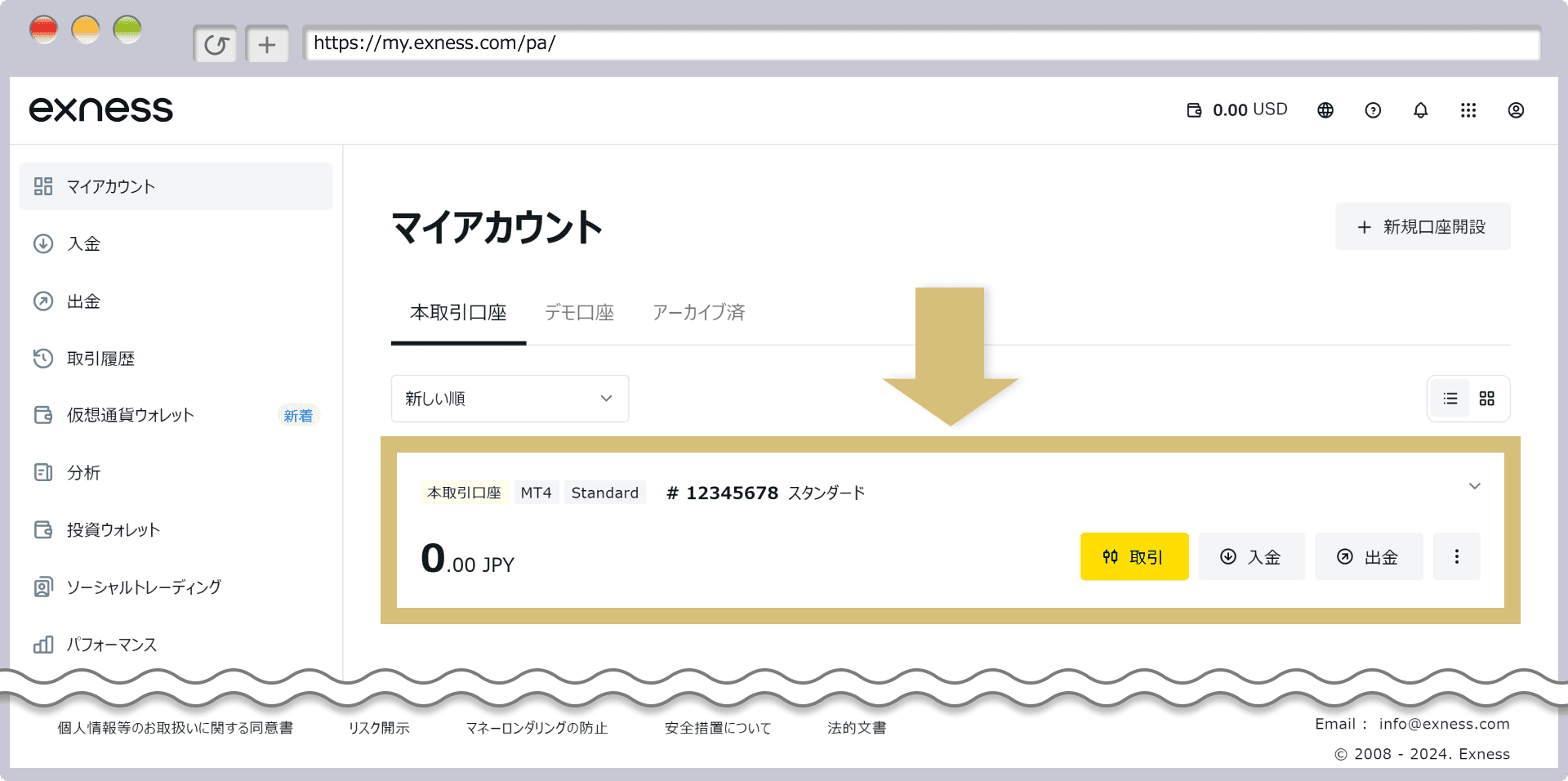
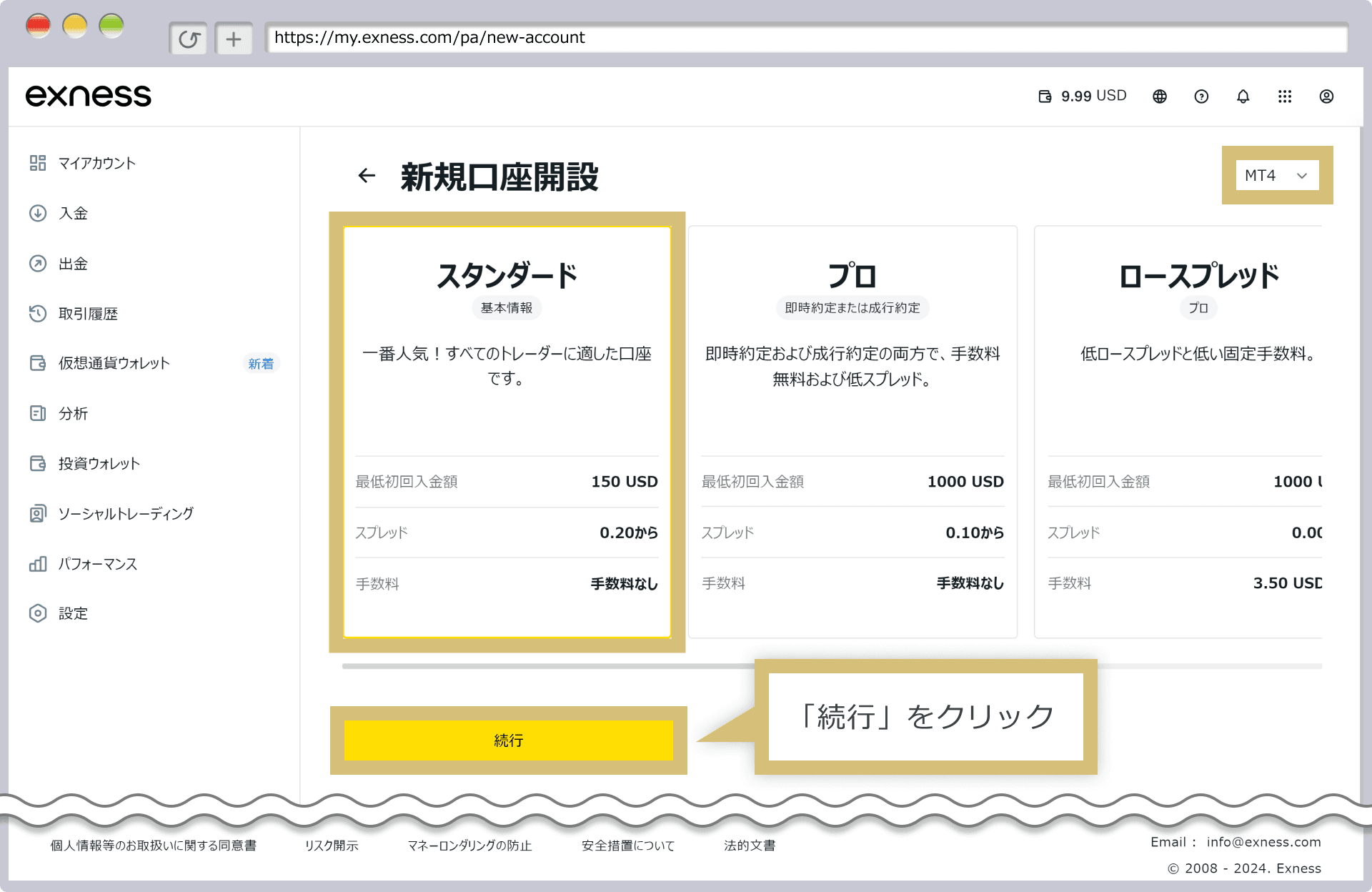
- 1Log in to Exness personal area → Click 'Add Account'
- 2Select 'MT5 Real Account'
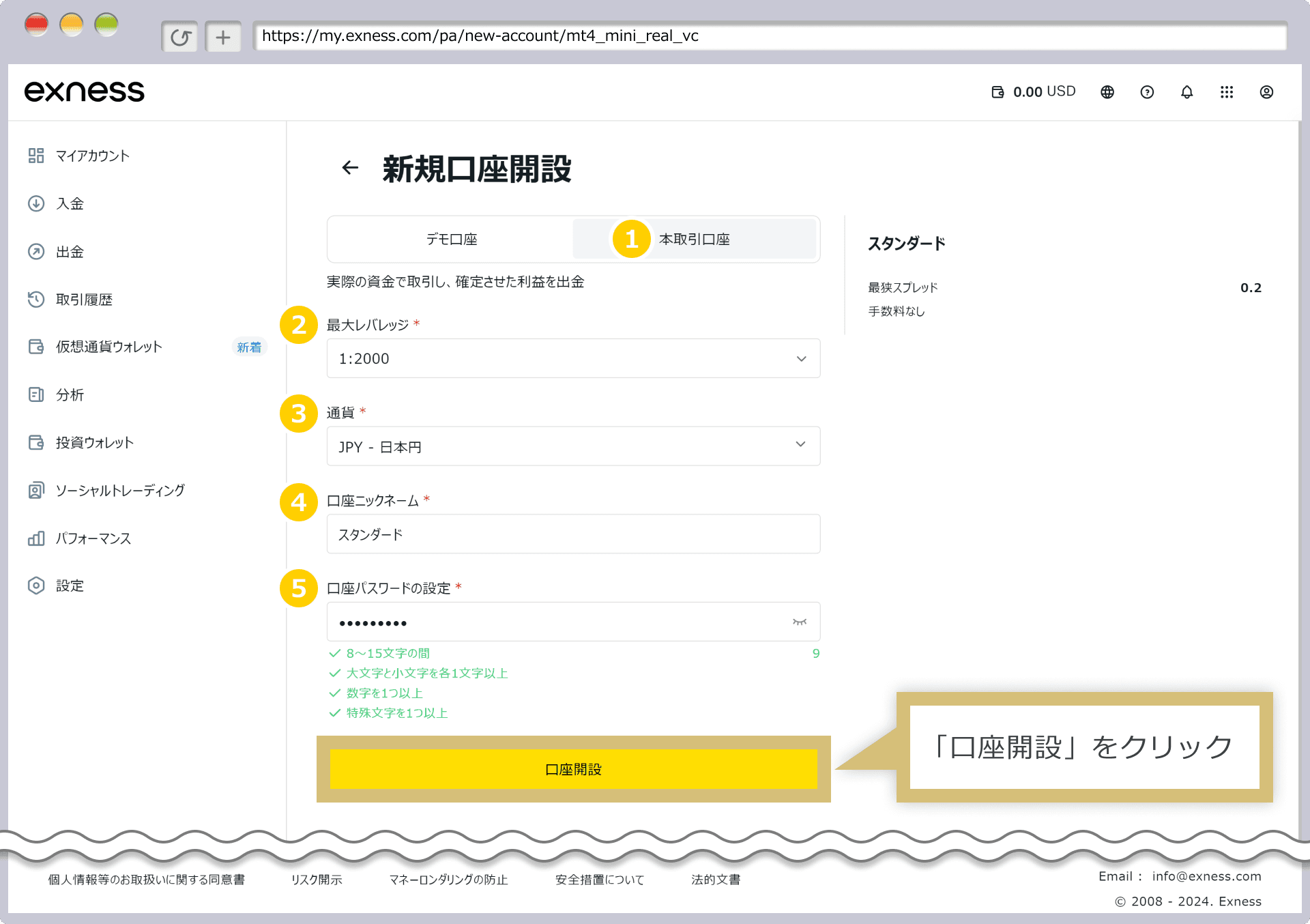
- 3Select account type (Standard / Pro / Raw Spread, etc.) → Account created
- 4Register the issued account number on our registration page
جدول مقارنة Exness مقابل XM مقابل HFM
| Item | HFM | XM Trading | Exness |
|---|---|---|---|
| Min. Deposit | $0 (بدون حد أدنى) | $5 | $10 |
| Leverage | حتى 2000x | Up to 1000x | Unlimited |
| GOLD (XAUUSD) Spread | متغيرة (~16-30 pips) | Variable (~30-50 pips) | Variable (~10-20 pips) |
| Bonus | نعم (مكافأة إيداع 100% وغيرها) | Yes (account opening up to ¥13,000; deposit 100% up to $500 + 20% up to $10,000) | None |
| Withdrawal | فوري - 24 ساعة | 2-5 business days | Instant - 24 hours |
| Sub Accounts | متاح | Available | Available |
| MT5 Support | ◎ | ◎ | ◎ |
| EA / Auto Trading | ◎ مدعوم بالكامل | ◎ Fully supported | ◎ Fully supported |
| Support | ◎ (متعدد اللغات) | ◎ (24 hours) | ○ (business hours) |
| Best For | رافعة مالية عالية وحد أدنى منخفض | Beginners, bonus seekers | قيمة شاملة وسبريد منخفض |
See Other Brokers
روبوتات الذهب للتشغيل على Exness
EAs built to exploit Exness's low XAUUSD spreads, each with real-data backtests. Forward results are measured on an Exness demo account.
الأسئلة الشائعة حول Exness
Q.How do I set up an EA on Exness MT5?▾
Create an MT5 account (Standard or Raw Spread) in the Personal Area → download MT5 and log in → copy the EA file into File > Open Data Folder > MQL5 > Experts and restart MT5 → drag the EA onto a chart and enable Algo Trading. The related article below walks through it with screenshots.
Q.Are Exness gold (XAUUSD) spreads suitable for EAs?▾
Standard accounts float around 10-20 pips (about $0.10-0.20); Raw Spread / Zero accounts are tighter still. XAUUSD spreads are among the lowest of offshore brokers, which suits scalping and grid-style gold EAs. Spreads do widen at rollover and around news, so keep your EA's spread filter enabled.
Q.Does Exness restrict EAs (automated trading) or scalping?▾
EAs are officially allowed, and there are no restrictions on scalping or hedging. Leverage goes up to unlimited (subject to conditions) and the stop level is zero, so pending orders and stops placed close to price are rarely rejected. Execution is market execution, so your EA logic runs as designed.
Q.Are withdrawals really instant?▾
Most withdrawals are approved automatically; e-wallets and crypto usually arrive within minutes, while bank transfers can take a few business days. Funds go back by the same method you deposited with, and withdrawals are held until KYC verification is complete, so finish verification when you open the account.
Q.Can I use separate sub-accounts for each EA?▾
Yes. You can open multiple additional accounts free of charge from the Personal Area, and internal transfers between them are instant. Running each EA on its own account makes it easy to track performance, manage margin and avoid magic-number clashes. See the sub-account guide above on this page.
※ Links on this page are affiliate links. If you open an account through them, we receive a referral commission. This is how we can offer EAs for free. No additional cost to users.
مقالات مدونة ذات صلة